Category Archives: TradeStation

Unlocking a Gann-Based Pivot System with My “Intelligent Stack” Design

A Wheel Within a Wheel: Recording Market Events Beyond the Daily Bar

Dust flew as I opened my trading system vault. With more than 1,000 systems tucked away, why pull out Gann Pivot? Two reasons: its entry rules make an excellent coding example, and they give me a practical way to introduce my Intelligent Stack library.

In my opinion, Bruce Babcock’s choice of the Gann name served two purposes: recognition among the many “Gannsters” studying his work, and a connection to Gann’s interest in swings and market turning points. That is my interpretation, rather than a documented statement of Babcock’s intent. Despite the name, this system does not require astrology, biblical interpretation, or elaborate geometric calculations. Its rules focus on price pivots, the trading days between them, and risk management. I would describe it as Gann-inspired swing trading, rather than an attempt to reproduce his more esoteric methods. There is an irony here: Bruce Babcock criticized Gann in his own writing, yet attached Gann’s name to this system. Perhaps the distinction was between Gann’s more esoteric explanations and the practical value of swing-based trading rules. Whatever his reasoning, the system gives us something concrete to define, code, and test.

The “wheel within a wheel” idea resurfaced during a recent session with a client. We were using a two-dimensional EasyLanguage array to store information whenever certain market events occurred. Explaining how to move and retrieve those values required more array gymnastics than I wanted. My client is exceptionally sharp and caught on quickly, but I kept thinking: the interface should make the trading logic easier to understand, without making the array bookkeeping part of the lesson.

Years ago, I built structures in Fortran to handle similar bookkeeping. For this example, I wanted to bring that approach into EasyLanguage through a simple stack interface.

A conventional stack is a last-in, first-out collection: you push new items onto the top and pop them off. My Intelligent Stack borrows the newest-at-the-top organization but serves a different purpose. We do not need to pop our pivot history. Instead, we push new observations, inspect older entries with seek, and let the library handle the underlying array bookkeeping. When the stack reaches its capacity, the oldest observation drops out of the bottom.

Gann has also been on my mind lately. My friend and colleague, Mike Chalek, explores Gann’s cycle analysis and price geometry through his work at AstroTimeCycles.com. Although some of these ideas fall outside my usual approach, nearly 40 years of research have taught me not to dismiss a trading method simply because it sounds esoteric. If its rules can be defined, coded, and tested, I am willing to give it a fair examination.

Bruce Babcock published the basis of this system over 30 years ago. He was part of the first generation of system vendors. He published a pioneering book on trading system design – Babcock, B., & Williams, L. R. (1989). The Dow Jones-Irwin guide to trading systems. Dow Jones-Irwin. Foreword by Larry Williams.

The rules from the outside seem simple and reasonable:

Long Entry Rules

Evaluate the following conditions after each trading day’s close:

  1. Identify a new high pivot. Yesterday’s high must be strictly higher than both the preceding day’s high and today’s high:
    High[1] > High[2] and High[1] > High[0]

    Yesterday is the pivot day; today’s completed bar confirms it.

  2. Find the most recent earlier, higher high pivot. Search backward through the stored high pivots until you find one whose price exceeds the newly confirmed pivot high. If none is found within the stored history, there is no new long setup.
  3. Find the lowest intervening low pivot. Between these two high pivots, locate the low pivot with the lowest price. A low pivot is a day whose low is strictly lower than the lows of the preceding and following days.
  4. Measure the time from that low to the recent high. Count trading bars beginning with the day immediately before the recent high pivot and ending with the intervening low pivot day. The count must be at least 20 bars.
  5. Place the entry order. If the setup qualifies, place a buy stop for the next trading day one tick above the recent high pivot.

Timing clarification: The 20-bar requirement applies to the distance between the intervening low pivot and the recent high pivot—not between the two high pivots

Short Entry Rules: 

  1. Just reverse the long entry rules.

Exit Rules:

These are the rules that were published way back in the early 1990s.  So, the dollar values would need to be adjusted.  However, you will get the general idea.

A simple $1000 fixed stop from entry.  Imagine trying to trade gold or crude with this tight of a stop.

A Ratcheting Percent Trailing Stop protects a growing share of a trade’s profit. It activates once closing profit or maximum position profit exceeds $1,600 per contract. Each additional $1,500 reduces the permitted giveback by five percentage points.

Highest Closing Profit Giveback Allowed Profit Protected
$1,600* 70% $480
$3,100 65% $1,085
$4,600 60% $1,840

The first row illustrates the starting level; activation occurs just above $1,600.

The stop tightens as the trade profit increases and never loosens when profit declines. I’ll explain the calculations and implementation in a later post.


Doesn’t EasyLanguage OOEL already include a Stack object?

Yes. TradeStation’s object-oriented EasyLanguage library includes a conventional stack with Push, Pop, and Peek operations. TradeStation documentation

My Intelligent Stack serves a different purpose. Built with ordinary EasyLanguage arrays and functions, it stores a fixed number of observations with the newest in slot zero. When it fills, the oldest observation drops out of the bottom.

For pivot analysis, we need to inspect earlier entries without removing them. My seek function provides that access, while other library functions calculate averages, standard deviations, and more. There is no pop operation because this application needs a searchable history rather than a collection we consume one item at a time.

Think of it as a bounded, newest-first history collection with the array bookkeeping tucked behind a simple interface.

Why My Intelligent Stack Design?

First off, you don’t need to enter the world of objects to use my

libraries.  I teach EasyLanguage to traders, so I try to keep things as simple as possible.  Introducing a two-dimensional array can quickly cause confusion.  My stack structure is based on synchronized single dimension-ed arrays.  And I use the word stack in all my functions.

Stack declaration

Arrays:
HPvt_stack[200](0),
LPvt_stack[200](0),
HPvtBN_stack[200](0),
LPvtBN_stack[200](0);

Here I create 4 stacks using Array declaration.  I dimension them to 200 and set the initial elements to zero.  Remember arrays are just lists that can be indexed.  The HPvt stacks are to be synchronized when using them.  In the same manner so is the LPvt stacks.

Pushing data onto a stack

    Value1 = Stack.Push(H[1],HPvt_stack,200);
Value1 = Stack.Push(barNumber-1,HPvtBN_stack,200);

When I discover a pivot high I push the price and the barNumber-1 onto their respective stacks:  HPvt_stack and HPvtBN_stack .

After pushing all four pivots:

Array Index HPvt_stack HPvtBN_stack Meaning
[0] 4 4 Number of stored pivots
[1] 110.00 138 Newest pivot
[2] 106.75 125 Previous pivot
[3] 108.50 112 Older pivot
[4] 105.25 100 Oldest pivot

Each new push places the pivot’s price and bar number at index [1], shifts older entries down, and updates the count at [0]. Matching indexes in the two stacks always describe the same pivot.

The library handles the shifting and count updates, so users can focus on the trading logic. They only need to declare the arrays with enough capacity; the stack functions manage the contents.

EasyLanguage arrays are zero-based. My implementation reserves that first element, [0], for the count and stores observations beginning at [1].

Why Do I Call Them Intelligent Stacks?

I built a collection of functions that do more than store and retrieve values. They can calculate averages, standard deviations, and other statistics over an entire stack or a selected portion. For example:

value1 = Stack.Average(chanWidthStack,20);

This calculates the average of the 20 most recent stored observations. All library functions use the Stack. prefix.

Some functions come in two forms:

value1 = Stack.Highest(HPvt_stack);
value2 = Stack.HighestIndex(HPvt_stack);

value1 contains the highest price in the stack. value2 contains its location, or index.

Why return the location? Because our price and bar-number stacks hold related information at matching indexes. If the highest price occupies slot [3] in HPvt_stack, its bar number occupies slot [3] in HPvtBN_stack. We retrieve it with:

highestPivotBar = Stack.Seek(HPvtBN_stack,value2);

The index connects the two stacks, telling us both what the highest pivot price was and when it occurred.

Now let’s put these functions to work. Each time a new pivot high is confirmed, we search the stored pivots for the most recent higher pivot high. Its bar number defines our search boundary. We then locate the lowest intervening pivot low and check whether it occurred at least 20 bars before the new pivot high. Notice how the index-returning functions connect prices with their corresponding bar numbers.

if HighPivotFormed(1,0) <> -999999 then
begin
currentHPvtBN = BarNumber - 1;
priorHPvtIndex = -1;
endIndex = 0;
interLowIndex = -1;

{ Find the most recent higher pivot high. }
if Stack.Size(HPvt_stack) > 0 then
priorHPvtIndex = Stack.GreaterIndex(HPvt_stack,H[1],1);

{ Bound the low-pivot search using that pivot's bar number. }
if priorHPvtIndex <> -1 then
begin
priorHPvtBN = Stack.Seek(HPvtBN_stack,priorHPvtIndex);
endIndex = Stack.LesserIndex(LPvtBN_stack,priorHPvtBN,1) - 1;
end;

{ Find the lowest pivot low within the search range. }
if endIndex >= 1 then
interLowIndex = Stack.LowestRangeIndex(LPvt_stack,1,endIndex);

{ A qualifying low establishes or replaces the pending buy order. }
if interLowIndex <> -1 then
begin
interLowPivotBN = Stack.Seek(LPvtBN_stack,interLowIndex);
interLowCount = currentHPvtBN - interLowPivotBN;
if interLowCount >= interveningPvtTrigger then
begin
buyPrice = H[1] + tickOffset * MinMove / PriceScale;
buyOrderBN = BarNumber;
end;
end;
Finding an intervening lowest pivot low between pivot high boundaries

Are you Bewildered?

I know this code looks a little bit on the gross side.  I can tell you that it is better than the loopy version and we now have a nice library of functions that we can use with our stacks.  Let’s break it down.

    { Find the most recent higher pivot high. }
if Stack.Size(HPvt_stack) > 0 then
priorHPvtIndex = Stack.GreaterIndex(HPvt_stack,H[1],1);

{ Bound the low-pivot search using that pivot's bar number. }
if priorHPvtIndex <> -1 then
begin
priorHPvtBN = Stack.Seek(HPvtBN_stack,priorHPvtIndex);
endIndex = Stack.LesserIndex(LPvtBN_stack,priorHPvtBN,1) - 1;
end;
First two steps explained

Once a new pivot high is confirmed at H[1], the first if checks whether HPvt_stack contains any earlier pivot-high prices. If it does, Stack.GreaterIndex(HPvt_stack,H[1],1) searches for the first price greater than H[1]. Since the newest entry is stored at [1], this finds the most recent qualifying pivot high. The function returns its location in the stack, or -1 if none is found.

The second if proceeds only when a match exists. We use its index with Stack.Seek to read the corresponding bar number from HPvtBN_stack. Remember, the price and bar-number stacks are paired: matching indexes describe the same pivot.

That bar number establishes the older boundary for our next search. LPvtBN_stack contains the bar numbers of stored pivot lows, also ordered newest first. Stack.LesserIndex finds the first low pivot that occurred before our qualifying high pivot. Subtracting one from that index excludes this older low and everything below it. The resulting endIndex bounds the portion of LPvt_stack we will search for the lowest intervening pivot low.

In other words, we have located the bar number of the prior qualifying pivot high and use it as the boundary for our backward search. We now need to find the lowest pivot low between that boundary and the newly confirmed pivot high, along with its bar number. The stack functions handle the searching internally, so our strategy code does not need its own search loops.

   { Find the lowest pivot low within the search range. }
if endIndex >= 1 then
interLowIndex = Stack.LowestRangeIndex(LPvt_stack,1,endIndex);

{ A qualifying low establishes or replaces the pending buy order. }
if interLowIndex <> -1 then
begin
interLowPivotBN = Stack.Seek(LPvtBN_stack,interLowIndex);
interLowCount = currentHPvtBN - interLowPivotBN;
if interLowCount >= interveningPvtTrigger then
begin
buyPrice = H[1] + tickOffset * MinMove / PriceScale;
buyOrderBN = BarNumber;
end;
end;
Find the intervening lowest low pivot and validate the current pivot high

Working within our stack environment, we use Stack.LowestRangeIndex to locate the lowest pivot low within the search range in LPvt_stack. We then use that index to retrieve its corresponding bar number from LPvtBN_stack. If the newly confirmed pivot high occurred at least 20 bars after that low, we have a qualifying setup. We establish a fresh buyPrice one tick above the new pivot high.

The trickiest part of this example is using an index to connect a pivot’s price in one stack with its bar number in another. Most single-stack tasks are simpler: call a function to retrieve a value, find an extreme, or calculate an average. Here, the paired stacks let us answer both what happened and when it happened.

A Wheel within a Wheel

Our Intelligent Stack separates the storage of observations from EasyLanguage’s bar-by-bar history. Instead of recording a value on every bar, we push a value only when an event occurs, such as a newly confirmed pivot. We retrieve earlier events through stack functions rather than ordinary series indexing. This creates a second history inside the daily chart: one measured in market events instead of bars. That is our “wheel within a wheel.”

Original Results over the past 20 Years – no execution fees charged

This material is for educational purposes only and does not constitute investment advice. Futures and options trading involves substantial risk of loss and is not suitable for every investor. Any performance data shown is hypothetical and may not reflect actual results. You may lose more than your initial investment, and losses can occur quickly. Do not trade with money you cannot afford to lose. The information provided is not a solicitation or offer to buy or sell any financial instrument, and no representation is made that any account will achieve similar results. Past performance is not indicative of future results. You are responsible for your own trading decisions and should seek independent financial advice before trading

These results show why 30-year-old dollar values do not keep up with the times.

Updated Dollar Values and Intervening Bar Count:

Email me for full source code and access to the limited Intelligent Stack functions discussed in this post.

Day Trading the 30-Minute Breakout, Again

The 30-Minute Breakout: A Classic Strategy Built on Simplicity

It seems like it is a good time, based on performance, to take another look at this simple model.  Just like bell bottom jeans, this simple approach flows in and out of fashion.  I revisited this strategy in my 2023 “Easing Into EasyLanguage – Day Trading Edition“ book.

Most day traders spend hours glued to their monitors, constantly scanning charts and second-guessing every tick. But some of the most effective strategies take the opposite approach: one trade per day, simple execution, and fixed risk.

Back in 1998, I was sitting in a crowded ballroom at a trading convention in Orlando. The keynote speaker stepped up to the stage, pulled up a PowerPoint presentation, and unveiled a strategy that was already considered an “oldie” back then.  We had actually been trading derivatives of this approach for more than 15 years at this point.

“Oldie” is probably an appropriate word to use—the core concepts of the Opening Range Breakout (ORB) and the Opening Range Breakout with Pattern (ORBP) had already been floating around the industry for over two decades.

In fact, one of the most exhaustive works on the subject was published back in 1990 by Toby Crabel and released by my friend Ed Dobson at Traders Press: Day Trading with Short Term Price Patterns and Opening Range Breakout. Following the multi-billion-dollar success of Crabel’s firm, Crabel Capital Management, that single out-of-print hardcover became a true holy grail item—regularly fetching anywhere from $500 to over $1,000 on the secondary market.

You can even watch the team at Crabel Capital discuss how those core quantitative principles scaled up in this J.P. Morgan featured interview.

Getting back to 1998 – Looking around the room, people were transfixed. Slide after slide showed successful breakout after successful breakout.

Even today, breakout trading remains one of the most widely used entry techniques across the market. Why? Because this specific approach checks almost every box a trader could want:

  • One trade per day — Essential for preventing revenge trading, though modern market microstructure often causes early breakouts to fail. Hard-coding a rule to fade that initial failed move can actually turn a false breakout into a high-alpha opportunity.

  • No screen-staring — You don’t need to sit at your desk all session.

  • Defined risk — Built-in protection and zero overnight risk.

  • Easy automation — Follows the Keep It Simple, Stupid (KISS) principle to a T.

Here is how the classic setup works:

  1. Wait for the Setup: At 9:55 AM Eastern, look at your 5-minute chart. Wait for that 9:50–9:55 AM bar to close (completing the first 30 minutes of the trading day).

  2. Set Your Orders: Place a buy stop order one or two ticks above the highest high of those first six 5-minute bars, and a sell short order one or two ticks below the lowest low.

  3. Execute: Wait for one side to trigger. As soon as you get filled on one side, cancel the opposing entry order and convert it into your liquidation/stop-loss order.

  4. Manage Risk: Early market volatility can sometimes create a range that is too wide for your risk parameters. If the dollar risk between the channel high and low is greater than your personal risk tolerance, use a pre-set disaster stop or simply skip the trade.

Trading doesn’t have to be complex to be effective. Sometimes, stepping back and letting a classic rule-based strategy do the heavy lifting is the smartest move you can make.

Step 1: Fire Up the Code Editor

When a strategy with this kind of mileage crosses your desk and catches your eye, your first job isn’t to start placing trades—it’s to translate it into code.

Now, since the rules fit on the back of a napkin, you’d naturally assume writing the script would be a piece of cake. You can even prompt your favorite AI to whip up the code, and to its credit, it’ll get you about 80% of the way there. But as any veteran EasyLanguage programmer knows, the devil is always in the details. There’s almost always a sneaky little hiccup lurking in the logic—whether it’s an off-by-one error in your bar counts, a weird multi-data alignment issue, or an order that fills when it shouldn’t.

More importantly, build parameterization into the code from the beginning. The goal is not to curve-fit the past into a fragile illusion of perfection, but to find parameter ranges that place the strategy in the right ballpark for today’s electronic markets. Risk and reward characteristics evolve as stock indexes reach new highs and volatility changes with them.

Email me at george.p.pruitt@gmail.com to get the EasyLanguage source code.  

Here are the key variables I always like to isolate and test:

  • The Breakout Window: The 30-minute opening range is a classic that’s been around since the floor-trading days. But is 30 minutes still the magic number? Opening up a search space for 15, 30, or 45-minute ranges lets the data tell us how modern volatility behaves.

  • Capital & Trade Risk: On fast-moving contracts like the ES or NQ, a wide 30-minute opening bar can yield a stop-loss distance that’ll blow right past your account’s risk budget. We need a disaster stop override.

  • Profit Targets: Riding a trade to the final bell sounds great in theory, but late-day momentum can turn on a dime. Testing defined profit objectives helps us figure out if taking money off the table beats hoping for a strong closing bell.

  • Break-Even Triggers: Let’s face it—false breakouts happen, and in today’s algorithmic environment, they happen a lot. Introducing a break-even stop once a trade moves a certain number of ticks or dollars into the green can salvage capital when the initial push was purely manifested by stop runners.

  • Adding the Pattern to the ORB:  If you allow this simple strategy free reign it will almost certainly trade every day.  In this simple test we could utilize some of Toby Crabels volatility constraints.
    • NR-7:  Yesterday must be the narrowest range of the past seven days
    • NR-4:  Yesterday must be the narrowest range of the past four days.
    • TR vs. ATR:  Compression or expansion.  Was yesterday’s True Range greater than or less than the 20-Day Average True Range.

Here is the analysis from July 2018 through July 2023.  I picked this period because this is when I published the book plus five years prior.  Tested on @NQ.D without commission and slippage.

  1. Optimize risk versus reward while ignoring break even and range filters:
    1. profit objective from $3,000 to $9,000 by $1000
    2. stop loss: $1500 to $3000 by $500
  2. Optime risk versus reward versus breakeven ignoring range filters
    1. profit objective from $3,000 to $9,000 by $1000
    2. stop loss: $1500 to $3000 by $500
    3. break even stop from $1500 to $2000 by $250
  3. Optimize range filters
    1. NR4
    2. NR7
    3. Range compression and expansion

3-D Visualizations and Discussion

Optimzation 1:

Objective function:  Net Profit

Reward.  Nice results across a nice high and level plateau.  The strategy wants a lower risk per trade, but it wants the profits to run.

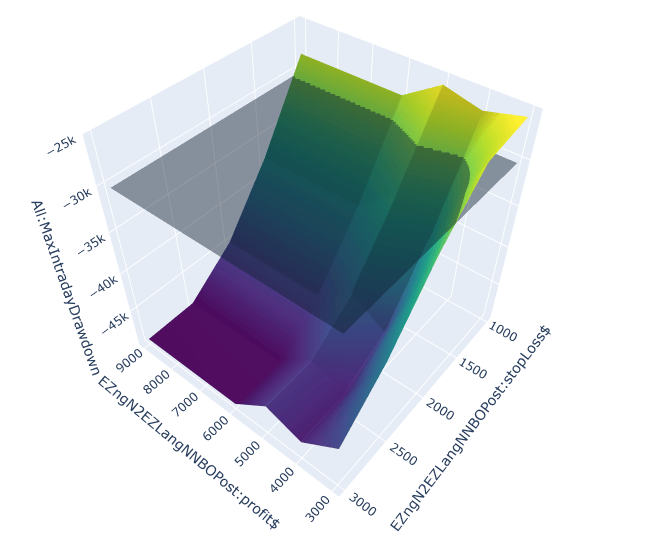
Objective Function:  Maximum Draw down

Risk.  Well, we are dealing with AI and Mag7 volatility here.  Very few results with less than a $30K draw down.  We are bumping up against the wall risking $1000 per trade.  We could push through the wall but I personally don’ think it is worth the effort.

Optimzation 2:

Objective function:  Net Profit

Plotting two parameters on a 3D chart is straightforward. Adding a third requires an extra step. We can still plot a result at each X–Y coordinate, but multiple results may now share that same coordinate because of the third parameter. To create one surface, we accumulate those results and plot their average at each unique X–Y location.

Reward.  Nice results across a nice high and level plateau, again.  The introduction of the Break-Even optimization changed the surface.  Remember we are looking at aggregate statistic at each X and Y not just one point.

Objective Function:  Maximum Draw down

Risk.  This was somewhat surprising.  The Break-Even addition returned all values (when averaged) at each X and Y between -$20K and -$30K.

Heat Map of Risk (3 parameters).  A chart like this is hard to see unless you rotate them.  I like to look at a Heat Map as well.  The following map shows a lower draw down values at lower stop loss and profit objectives.  Logical, right?

Heat Map of Risk (2 parameters).  What does the 2 parameter optimization heat map look like?

I think we can conclude the application of a Break-Even trade as a plus for the system.  Very few X and Y show desirable results.

Trade Filtering – Good or Bad:  Neither NR4 or NR7 were productive.  However, comparing yesterday’s True Range with the ATR produced some surprising results.

This demonstrates we need volatility but not too much volatility.  Trade filtering goes hand in hand with the amount you want to risk.  Filtering trades diminishes executions and therefore reduces exposure.

Final System:

Risk: $2000 – Reward: $9000 – BreakEven: $1500 – Volatility TR < 1.5 X ATR

Walk It Forward

Walked forward from August 2023 – this was the endpoint we used in the optimization process. A good fellow with just a hint of a temper.

Too much money too quickly!

Incubation Assessment
Overall Assessment: Degraded
Risk Assessment: High Risk
Incubation Readiness Score: 4 / 8
Return delivery is running ahead of baseline: expected annual return is 318% versus actual annual return of 434%, and expected annual gain of $39,732 compares with actual annual gain of $54,197. However, that stronger return delivery has come with a less stable path and/or materially heavier risk than history would suggest. Risk is materially worse than the historical profile: actual worst drawdown of $35,005 is 1.720 times the historical drawdown of $20,355. Risk conditions are in the High Risk range. The realized monthly path is no longer tightly aligned with the baseline, based on monthly equity correlation of 0.960, projection RMSE of $55,147, normalized RMSE of 1.388, and path wander ratio of 0.476.

Correlation still shows directional similarity, but the path wander ratio indicates noticeable drift away from the projected path over the same window. Monte Carlo context is cautionary: actual forward equity is $162,590, gain percentile is 78% (in the upper quartile), and drawdown percentile is 84% (in the upper quartile for drawdown stress). Taken together, the system shows meaningful deterioration in incubation.

That flat period at the beginning of the test period looks a little suspect, right?

Monte Carlo It

Running 2500 simulations with $50K initial capital and then extracting a typical year out of the results you get this:

This is what you get when you perform a Monte Carlo analysis over a time period that shows exceptional results.  However, the very best and very worst trades were removed first before the shuffling.

Top left corner is most dense quadrant = GOOD!

Walk it Backward!  Bell Bottom Jeans!

The 30-minute rule during this period of time was dismal.  Just like Bell Bottom jeans in the 1980s.

From Generated Strategies to Engineered Systems: Why Good Numbers Are Only the Beginning

The Throwing-Spaghetti-Against-the-Wall Approach

We now have all sorts of platforms that can test seemingly innumerable combinations of patterns, indicators, trade management rules, markets, and time frames. We have seen systems work on 60-minute bars, but fail completely on 120-minute bars. Popular candlestick patterns are aggressively used to generate systems that pass whatever gauntlet has been defined as “robust.”

The no-coding-required algo generators only look at the metrics. If a system looks great on a 445-minute chart using a HAMMER or HANGING MAN candlestick pattern, and it passes the out-of-sample inline stress testing, then it becomes one of the noodles that sticks to the wall.

I am not being critical of this overall approach. Expanding the search universe by using a wide spectrum of multi-minute bars is somewhat newer, and in many ways, somewhat novel. Back in the day, we mostly stuck with daily bars or common intraday intervals such as 15-, 30-, and 60-minute bars. A 445-minute bar was not even considered. But with today’s tools, almost anything is possible.

What I am critical of is the tendency to take those results at face value without drilling down into the underlying logic. A system that passes a statistical test is not automatically a system that makes sense. And more importantly, it is not automatically a system that can actually be traded.

Enter the Engineer

Plotting the algorithm on the chart and examining the actual trades is Step #1.

Why do this, you may ask? The code is the code. The generator produced an impressive-looking algorithm. The metrics passed the test. The equity curve looked promising.
But what if the algorithm just got lucky? What if it is already drifting away from its foundational premise?

For example, suppose I create a strategy using momentum along with the Hammer and Hanging Man candlestick patterns. The results look promising. A hypothetical generator was fed the available data, churned through the combinations, and produced the following candidate system:

Candidate System

Time Frame: 445-minute bars
Market: @ES
Buy: Momentum is positive and Hammer pattern occurs
Sell Short: Momentum is negative and Hanging Man pattern occurs
Risk: $2,800 to make $5,600

From an engineer’s perspective, I kind of like it.

It has several attractive qualities:

  • It is symmetrical.
  • It is applied to a good, liquid market.
  • It uses a different time frame.
  • It involves time-tested candlestick patterns.
  • The risk-to-reward ratio is a clean 1-to-2.

But then the engineer asks the next question:

Can the bar interval itself be trusted?

You cannot slice a pie evenly using 30% slices.

Most trading days consist of 23 hours, or:

23 × 60 = 1,380 minutes

Now divide the trading day by the selected bar interval:

1,380 ÷ 445 = 3.10

Or stated another way:

445 + 445 + 445 = 1,335 minutes

That leaves a remainder of:

1,380 – 1,335 = 45 minutes

So, the chart does not really consist of four equal 445-minute bars. It consists of three large 445-minute bars and one small 45-minute bar.

That matters.

A Hammer or Hanging Man pattern detected on a 445-minute bar is not the same thing as a Hammer or Hanging Man pattern detected on a 45-minute cleanup bar at the end of the trading session. The pattern may have the same name, and the code may treat it the same way, but structurally it is not the same event.

This is where generated code becomes engineering work.

The generator saw a metric.
The engineer sees a structural problem

Small Piece at the EOD

But Can You Argue With the Numbers?

At this point, someone could reasonably say, “Yes, the final bar is shorter, but look at the performance report.”

And that is a fair objection.

The numbers appear impressive. The system produced a solid net profit, a respectable profit factor, and a reasonable percentage of winning trades. On the surface, the strategy looks like something worth pursuing.

But this is exactly where the engineer has to slow down.

Most candlestick patterns are built around the range, body, open, close, high, and low of the bar. In other words, the pattern is not just a label. It is a structural interpretation of price movement during a specific unit of time.

Here is the EasyLanguage definition of the Hammer and Hanging Man pattern:

BodyHi = MaxList( Close, Open ) ;
BodyLo = MinList( Close, Open ) ;
Body = BodyHi - BodyLo ;
PriceAvg = XAverage( Close, Length ) ;
BodyAvg = XAverage( Body, Length ) ;

oHammer = 0 ;
oHangingMan = 0 ;

if Body < BodyAvg
and Body > 0
and BodyLo > MedianPrice
and BodyLo - Low > Factor * Body
and High - BodyHi < Body

then
if Close < PriceAvg then
{ TREND IS down }
oHammer = 1
else if Close > PriceAvg then
{ TREND IS up }
oHangingMan = 1 ;

C_Hammer_HangingMan = 1 ;
Hammer/Hanging Man

The key element here is the current bar’s open-to-close body, along with the relationship of that body to the bar’s total range. That makes perfect sense when each bar represents the same amount of market time.

But do you really want to rely on a bar that always covers only 45 minutes when the other bars cover 445 minutes?

From an engineering standpoint, I do not believe the smaller bar provides enough information to fulfill the spirit of the complete pattern. The code may identify the shape, but the market structure behind that shape is not equivalent.

In this case, it appears that a malformed Hanging Man triggered a short sale. The 45-minute cleanup bar completed the pattern, and the system acted on it.

And yet, the numbers look good.

That is the trap.

A performance report can tell you that something worked historically. It cannot tell you whether the logic that produced those trades was structurally sound. That part still requires inspection, judgment, and engineering.

My goodness!

Do You Throw the Results Out Over a Technicality?

Not necessarily.

This is where engineering judgment comes into play. The fact that one of the trades was triggered by a malformed candlestick pattern does not automatically mean the entire idea is worthless. The performance report may still be pointing toward something useful. The combination of market, time frame, momentum filter, and trade management rules may contain real information.

But it does mean the results should not be accepted at face value.

The first question is not, “Did it make money?”

The first question is, “Did it make money for the reason I think it made money?”

That distinction matters.

If a strategy is supposed to exploit a Hammer or Hanging Man pattern, then the bars used to form those patterns should be structurally comparable. A 45-minute cleanup bar sitting next to three 445-minute bars may satisfy the code definition, but it does not necessarily satisfy the trading premise.

So I would not immediately throw the results away. I would move the candidate system into the engineering phase. That means isolating the questionable condition, removing or correcting the structural flaw, and then testing whether the core idea still holds up.

If the system falls apart after making those changes, then the original result was probably more fragile than it appeared. If the system survives, then you may have something more interesting.

That is the difference between throwing spaghetti against the wall and engineering a tradable system.

The generator found a candidate.

The engineer decides whether that candidate deserves to live.

Next Installment — Working Your Craft: Some Coding Required

Don’t worry — I do the heavy lifting for you.

But there is real value in sitting in front of the editor, debugging the code, flipping system components on and off, and examining the functions that drive the trades. That process is a win-win. Even if you do not grasp every minute detail, that is okay.

You do not have to become a full-time programmer to benefit from this exercise.

Understanding the why behind the code is often enough. Why did the trade trigger? Why did the pattern qualify? Why did the system enter there instead of somewhere else? Why did the performance report look good?

Those questions move you beyond blind acceptance of the results. They turn a generated candidate into something you can inspect, challenge, and eventually trust — or reject.

In the next installment, we will take the same strategy idea and make it more practical for real-time trading. The larger bar can still generate the signal, but the smaller bar can handle the execution. In TradeStation terms, Data2 can define the setup, while Data1 handles the trade.

Watching a system trade on a large bar can hide too much of the story. If a trade enters, gets stopped out, or takes a profit all within the same large bar, the report may tell you what happened, but it does not really show you how the trade unfolded.

That is why I like to watch the trade develop on a smaller execution bar. Seeing the five-minute bar crawl across the screen gives you a much better feel for the trade. You can see the entry, the follow-through, the hesitation, the stop pressure, and the eventual exit in a way that a large bar simply cannot reveal.

Maybe that is just me, but I find it much more satisfying.

And more importantly, it provides a clearer picture of whether the trade was realistically executable.

That is where the engineering really begins.


Is Your System Broken?

The Ultimate Test of Efficacy: Time

At Futures Truth, we focused on one thing: walk-forward results across hundreds of trading systems. Back then, the industry was unrecognizable compared to today—if you can even call what exists now an “industry.”

Just this morning, I was reminiscing about vendors who sold strategies for upwards of $5,000. Those packages usually consisted of a set of rules (disclosed or not) and a rudimentary DOS-based program to generate simple charts and next-day orders. This was well before the heyday of TradeStation; those days are gone forever, for better or worse.

Back then, if a system performed well in walk-forward analysis, it earned a ranking. In those days, a Futures Truth ranking meant something. Sometimes, however, that ranking felt like a curse. Critics even argued you could “fade” a top-ranked system and make more money by taking the opposite trade. The reality is that many of those legendary “Top Ten” systems—built for a different era—simply wouldn’t survive in today’s markets.

Side Bar:  There are still services such as Striker and The Collective that still monitor trading systems.  Striker only shows real execution, which is mostly a good thing – real execution costs are shown.  But so is broker error.  Heck, we are all human and we all make mistakes.  Striker is upfront with this, and they state they will do the best they can – execution can be a beast. 

Speaking of execution – The Sunday Evening Gap

A Traders Nightmare. Most likely Trend Followers were short during the huge gap here!

 Imagine, having a stop order in crude oil on a Sunday evening when the market opens thousands of dollars through your stop.  If a system derived position is short the broker’s only directive is to GET OUT – no matter what, at the first off ramp.  The above chart shows a single contract slip on crude futures at the genesis of the Iran War.

The Million-Dollar Question

The second most common question I was asked at Futures Truth was: “How do I know if the system I’m trading is broken?”

Can you guess the most common one? “If it were your money, which system would you trade?”

We never answered that one directly; there was never a simple black-and-white answer. But the second question—the one about “broken” systems—usually surfaced when a trader was deep in a drawdown.

Seasoned traders know that systems ebb and flow; drawdown is simply the “tax” we pay to play the game. Others, however, get “married” to a system and stick with it until “death do us part.” My standard response back then was always:

“Is your current performance still within the boundaries of the backtest?”

In other words, has the system exceeded its historical maximum drawdown by a meaningful margin? Does the current real-time performance look like other “rough patches” in the historical equity curve? If the answer was yes, the trader would usually give it a little more room.

Into Unexplored Waters

Those were simpler days, but the core problem remains: we cannot see the future. No forward analysis can tell you with certainty what a trading system will do next. What it can do is tell you when the system has moved into “unexplored waters.” Once you know that, the decision to stay, abandon, or pause becomes much easier.

All trading systems oscillate between success and failure. If a system has a genuine technical edge, that edge may eventually reassert itself—provided you have the time and capital to wait. But most traders don’t have unlimited resources.

Recently, the market activity surrounding the Iran conflict has pushed many systems into intense drawdowns. The same old questions have reared their heads again. This time, however, I wanted to provide a more empirically derived analysis. I’ve developed a disciplined approach to measuring risk and reward that moves beyond “gut feel.”

To illustrate, I pulled a system off my shelf that I originally designed for retail consumption back in June 2018. Here is how it’s currently holding up:

Hypothetical Results: Before and after development.

The Profit Mirage

This is a mean-reversion approach. I remember thinking back in 2018: How much longer can this bull market continue? With that in mind, I utilized a simple regime filter. After just a few weeks of trading later that year, I genuinely thought the system might be broken. The market spent a large portion of that fall and winter below its 200-day moving average, and shorting simply wasn’t working.

The system then went dormant for a long stretch, finally “waking up” at the height of the pandemic. Had you stuck with it, you would be up significantly today (though we stopped trading right at the onset of the pandemic).

But here is the catch: Profit, by itself, is not enough to determine if a system is broken. As long as they are making money, most traders never bother to peek below the surface. This system would likely be sitting near the top of the Futures Truth rankings today. But let’s dive in and see how it actually performed on its “test of time.”

Test 1 – Baseline Projection

Baseline projection based on in sample average monthly return.

Is Outperformance Always a Good Thing?

Looking at the chart above, you see a steep deviation below the baseline initially, followed by a rocket-ship move to the upside. By late 2025, the actual equity is sitting way above the red dashed expectation line.

Most traders would see this and think they’ve struck gold. “Isn’t this what we want—a strong positive deviation?” they’d ask.

In a world of simple “bottom-line” thinking, the answer is yes. But in the world of professional algorithmic trading, this chart is screaming a different story. To a seasoned developer, deviation is deviation. Whether it’s to the upside or downside, moving this far away from the “expected” path suggests that the strategy’s original statistical model is no longer in control.

When a system starts generating 190% of its expected return, it’s often because it has inadvertently stepped into a high-volatility regime it wasn’t designed to navigate. If the “upside” is this aggressive, you can bet the “downside” risk has scaled right along with it.

Test 2:  Monte Carlo Analysis on Walk Forward

Return and Drawdown sitting on the tails.

The Statistical Reality Check

To understand why I called this system “Degraded” despite the profits, we have to look at the Monte Carlo Walk Forward distributions. This is where we compare real-time performance against thousands of simulated “alternate realities” based on the system’s history.

1. The Equity Distribution (The Good News… or is it?)

In the top chart, our actual forward equity of $67,575 (the dashed red line) sits at the 97th percentile.

  • Interpretation: Out of 1,000 possible outcomes, the system performed better than 970 of them. While this looks great, being this far out on the “tail” of the distribution suggests we are no longer operating in a normal environment.

2. The Drawdown Distribution (The Warning)

The bottom chart is the real story. The actual worst drawdown reached $18,588, placing it in the 98th–99th percentile of severity.

  • The Comparison: The median expected drawdown was only $8,125.

  • The Verdict: We have blown past the 90th percentile of $13,611 and are deep into the “danger zone.”

The Bottom Line

When a system hits the 97th percentile for gains but simultaneously hits the 99th percentile for drawdown stress, the math is telling you that the character of the strategy has changed. You aren’t just trading a system in a “rough patch”—you are trading a system that has moved into a risk regime it was never built to survive. This is the “evidence-based framework” I mentioned earlier. Without these charts, you’re just guessing. With them, you have the data to justify stepping aside.

The Verdict: Test 3 – Overall Assessment

This is where the “gut feel” ends and empirical analysis begins. The following commentary is generated by my new software; a quasi-expert system designed to pair raw statistical results with descriptive, actionable interpretation.

Status: DEGRADED

Risk Assessment: CRITICAL RISK

Incubation/Trading Readiness Score: 4 / 8

Overall Assessment: Degraded
Risk Assessment: Critical Risk
Incubation/Trading Readiness Score: 4 / 8
Return delivery is running ahead of baseline: expected annual return is 18% versus actual annual return of 34% and expected annual gain of $4,477 compares with actual annual gain of $8,536. However, that stronger return delivery has come with a less stable path and/or materially heavier risk than history would suggest. Risk is materially worse than the historical profile: actual worst drawdown of $18,588 is 2.670 times the historical drawdown of $6,962. Risk conditions are now in the Critical Risk range. The realized monthly path is poorly aligned with the baseline, based on monthly equity correlation of 0.960, projection RMSE of $21,789, normalized RMSE of 4.867, and path wander ratio of 0.621. Correlation still describes directional similarity, but RMSE and path wander ratio show how far the realized path has wandered from projection over the same window. Monte Carlo context is cautionary: actual forward equity is $67,575, gain percentile is 97% (near the top of the simulated distribution), and drawdown percentile is 99% (in the worst decile for drawdown stress). Taken together, the system shows meaningful deterioration in incubation.

A readiness reading of 4 out 8 indicates this system right now has degraded to a point where caution and I mean extreme caution should be used in your decision to trade this strategy.  The major factors influencing rating are:

  • Return Attainment:   1.907 – — This indicates the system has achieved 190.7% of its historically expected return during the incubation/trading period. In practical terms, the strategy is generating returns at nearly twice the pace implied by its historical baseline.
  • Path Wander Ratio: 0.621 — This indicates that the actual equity path is deviating from the projected path by a meaningful amount relative to the total expected move over the incubation/trading period. Put simply, the system is not wildly off course, but it is no longer tracking the historical baseline tightly.
  • Drawdown Stress: 2.67 — This indicates that the actual worst drawdown has expanded to roughly 2.7 times the level suggested by the system’s historical baseline. Put simply, the strategy may still be generating return, but it is doing so while absorbing far more pain than its historical profile would justify.

Hindsight is always 20/20, and it is easy to say now that you should have stuck with the system. But with a large sample of out-of-sample trades showing this degree of deterioration, if I had to choose between staying with it, abandoning it entirely, or temporarily shutting it down, I would probably step aside and wait for conditions to settle down. Remember, not trading is an algorithm too.   Having the right tools to make this kind of decision is paramount, because they give you an evidence-based framework for explaining and defending your reasoning.

The Power of Incubation: Is Your Best System Collecting Dust?

How many systems do you have sitting on your shelf? I personally have at least a hundred, probably more. In this business, a little dust is not always a bad thing.

Figuratively speaking, the more “dust” a system has collected, the more real-time incubation it has endured. And that gives you something far more valuable than any backtest: pure, unadulterated out-of-sample evidence.

Seeds Waiting to Be Planted

Algorithmic trading development rarely produces just one system. It creates a trail of offshoots—versions that may have looked unremarkable or even mediocre during the initial build. Yet many of these forgotten systems are really just seeds waiting for the right environment.

When you revisit them months or even years later, you may find that a strategy which struggled in 2022 has bloomed into a powerhouse in 2026. Without a framework to measure that growth, you would never know.

Why You Need an Incubation Framework

Most traders revisit old systems by simply eyeballing an equity curve. An incubation framework goes much deeper by providing:

Historical Context: Does the dusty system’s recent performance still match its original DNA?

Regime Readiness: Has the market finally moved into the regime this offshoot was designed for?

The Go/No-Go Signal: A quantitative way to decide whether a seed is finally ready to be moved from the shelf to the server.

TS-SystemChecker software

TS-System Check Control Panel

A Tool Built for the Journey

I built TS-SystemChecker because, after decades at Futures Truth and years of developing my own strategies, I needed a better way to cut through the emotional fog that surrounds system evaluation.
I didn’t design TS-SystemChecker to be a black box or some kind of get-rich-quick shortcut. I built it because, after decades at Futures Truth and years of developing my own strategies, I wanted a better way to cut through the emotional fog that surrounds system evaluation.

Whether you are a retail trader focused on refining one core system, or a developer like me with a shelf full of offshoots, this framework was built for that journey.

For the specialist: If you have one system you live and die by, the deep-dive analysis helps define its boundaries of truth. You can begin to see whether a drawdown is simply part of the system’s normal character or evidence of something more structural.

For the portfolio manager: If you are tracking a library of ideas, the Batch Analysis feature helps you monitor many systems at once. Import the trade files, review the evidence, and identify which seeds may finally be ready to move from the shelf to a live account.

Looking Beneath the Surface

At the end of the day, this is why I built TS-SystemChecker. Traders need more than opinions, hope, or fear. They need a framework grounded in evidence.

That is the real purpose of this tool: not to make decisions for you, but to help you make better ones.

TS-SystemChecker Batch Mode

Monte Carlo: Garbage or Gold?

A quick history of Monte Carlo (the short version)


Monte Carlo Tool Link:  Read blog first:  Monte Carlo Trade Flight Simulator · Streamlit

Youtube Video on Monte Carlo Tool:  Youtube Monte Carlo Tool Video

Monte Carlo methods took off in the 1940s during wartime research at Los Alamos, when scientists needed a practical way to estimate outcomes for complex systems that couldn’t be solved with a single clean equation. Trading has the same problem: there’s no tidy formula that can tell you the order your wins and losses will arrive in—and that order is where luck lives.

So we do the next best thing: we add randomness on purpose. Monte Carlo repeatedly reshuffles the same trade outcomes to create many plausible equity paths, revealing how smooth (or brutal) the ride can be even when the system’s edge stays the same.

“No matter how sophisticated our choices, how good we are at dominating the odds, randomness will have the last word.” — Nassim Nicholas Taleb, Fooled by Randomness

What Monte Carlo does in trading

In trading system analysis, the “Monte Carlo move” is straightforward: you take your historical list of trade results (P/L per trade), then you randomly reshuffle (or resample) that list thousands of times. Each reshuffle produces a new, plausible equity curve built from the same underlying trade outcomes. From there, you measure the things that actually determine whether a system is tradeable—how deep the drawdowns get, how long the slumps can last, and how often the path gets ugly enough to force you to quit or cut size.

This doesn’t predict the future. It answers a different (and more practical) question:

Given the trade outcomes you’ve already seen, how good—or how bad—can the ride get due to sequencing alone?

That’s the value, or is it?

Why traders debate the value of Monte Carlo

Why some traders love it

  • It exposes fragility that a single backtest can hide.
    A backtest is one historical path—one specific order of wins and losses. Monte Carlo reshuffles that order to show other plausible paths. If a strategy only “works” when winners show up early, Monte Carlo will expose that quickly.

  • It turns vague fear into a measurable risk.
    Traders feel risk but struggle to quantify it. Monte Carlo lets you define a failure line (for example, “equity falls below 60% of starting capital”) and estimate how often that happens across thousands of simulated lives. You may still trade it—but now you’re choosing with a probability, not a gut feeling.

  • It helps you size the system rationally.
    Most blow-ups aren’t caused by a bad system—they’re caused by a decent system traded too big. By running the same trades under different starting capital (or leverage), Monte Carlo shows where the strategy becomes survivable. It often reveals a capital/size “threshold” where ruin risk drops and drawdowns become tolerable.

Why some traders hate it

  • It assumes the future behaves like the past.
    Monte Carlo can’t detect regime change. If your edge only works in certain “market moods” (trending vs choppy, low-vol vs high-vol), the simulation may look great right up until the market stops playing that game.

  • It assumes trades can be shuffled like a deck of cards.
    Many Monte Carlo runs treat each trade as an independent draw from the same bag of outcomes. Real systems aren’t that clean—markets come in streaks and clusters (volatility spikes, choppy stretches, correlation breaks), and those dependencies don’t always survive a simple reshuffle. Monte Carlo still helps measure sequence risk, but it isn’t a full market simulator.

  • It can punish good systems—and flatter lucky ones.
    A solid system can look worse if its history includes a few rare “tail” events—Monte Carlo will replay those tails in many sequences. Meanwhile, a strategy that enjoyed an unusually favorable historical run can look sturdier than it deserves, because the simulation is only as honest as the sample you feed it.

So, it’s not garbage… but it’s not gold automatically either.

Monte Carlo is a tool. Like any tool, it can be used well or used blindly.

The setup: how I ran these simulations

Monte Carlo Trade Flight Simulator · Streamlit

For these tests, I used my Streamlit-based Monte Carlo “Trade Flight Simulator.” You paste a column of trade P/L and the simulator generates:

  • Risk of Ruin based on a user-defined ruin line
  • Median drawdown across thousands of randomized equity paths
  • Worst-case outcomes (1st percentile)
  • Distribution visuals (“broom chart” equity fan + destination histogram)
  • Scaling table across start equity levels

Key settings used here

  • Ruin threshold: 60% of starting equity
  • Position size: 1 contract per trade
  • Execution costs: $40 per trade included in the trade list results you pasted
  • Horizon: number of trades pasted (the simulator runs “N trades” each life)
  • Optional CAGR is computed from first/last trade dates when provided

System #1: Mean Reversion on the Mini Nasdaq (MNQ)

~$40 execution costs, ~20 years

Start Equity Risk of Ruin Median DD Annual Return Worst Case (1st %)
$25,000 30% 42.9% 12.9% $85,019
$31,250 14% 36.2% 11.7% $80,747
$37,500 8% 32.2% 10.8% $93,072
$43,750 4% 30.1% 10.0% $78,308
$50,000 1% 26.4% 9.6% $81,352
$56,250 1% 25.2% 8.8% $93,765
$62,500 0% 24.4% 8.4% $77,907
$68,750 0% 23.0% 8.1% $81,076
$75,000 0% 20.6% 7.7% $81,108
$81,250 0% 19.1% 7.4% $89,028
$87,500 0% 18.9% 7.0% $81,982

System #1 — Mean Reversion (MNQ)

  • At $25,000 start equity
    • Risk of Ruin: 30%
    • Median Drawdown: 42.9%
    • Annual Return: 12.9%
    • Worst Case (1%): +$85,019
    • Prob > 0: 99.9%
  • At $50,000 start equity (“still not comfortable”)
    • Risk of Ruin: 1%
    • Median Drawdown: 26.4%
    • Annual Return: 9.6%
  • At $62,500 start equity (“stability zone”)
    • Risk of Ruin: 0%
    • Median Drawdown: 24.4%
    • Annual Return: 8.4%

What Monte Carlo reveals about this system

This is what a tradeable but under-capitalized system looks like.

The edge is real (the probability of finishing positive is essentially ~100%), but the sequence risk at low starting equity is still brutal:

  • A 30% risk of ruin at $25k (with a 60% ruin line) is not a rounding error.

  • Even at $31,250, ruin risk is still 14%.

  • The system doesn’t start to feel “professional” until you get into the $60k+ range, where ruin drops to 0% and median drawdowns settle into the mid-20% area.

Monte Carlo’s message:
If you want this system to behave like something you can actually stick with, you don’t optimize parameters — you capitalize it properly.

System #2: Trend Following on Crude Oil

~$40 execution costs, ~20 years

System #2 — Trend Following (Crude)

Start Equity Risk of Ruin Median DD Annual Return Worst Case (1%)
$25,000 68% 89.7% 8.7% -$99,928
$31,250 58% 80.7% 7.8% -$95,663
$37,500 47% 71.3% 7.1% -$100,991
$43,750 40% 64.1% 6.5% -$111,564
$50,000 31% 58.3% 6.2% -$98,846
$56,250 28% 57.0% 5.5% -$94,594
$62,500 22% 51.1% 5.3% -$100,349
$68,750 19% 49.9% 4.8% -$103,016
$75,000 16% 47.2% 4.5% -$112,968
$81,250 12% 42.3% 4.5% -$98,345
$87,500 11% 42.1% 4.0% -$98,228
  • At $25,000 start equity
    • Risk of Ruin: 68%
    • Median Drawdown: 89.7%
    • Annual Return: 8.7%
    • Worst Case (1%): -$99,928
    • Prob > 0: 87.3%
  • At $50,000 start equity
    • Risk of Ruin: 31%
    • Median Drawdown: 58.3%
    • Annual Return: 6.2%
    • Worst Case (1%): -$98,846
    • Prob > 0: 90.1%
  • At $81,250 start equity
    • Risk of Ruin: 12%
    • Median Drawdown: 42.3%
    • Annual Return: 4.5%
    • Worst Case (1%): -$98,345
    • Prob > 0: 86.4%
  • At $87,500 start equity
    • Risk of Ruin: 11%
    • Median Drawdown: 42.1%
    • Annual Return: 4.0%
    • Worst Case (1%): -$98,228
    • Prob > 0: 87.1%

What Monte Carlo reveals about this system

This is a classic crude trend-following signature: the system can be profitable over time, but the path can be violently unforgiving—especially when under-capitalized.

  • The probability of finishing positive is only in the mid-to-high 80% range, not “near-certain.”
  • At $25,000, the system is living on the edge: 68% risk of ruin with an 89.7% median drawdown.
  • Even after you scale up, the ride is still rough. At $81,250, ruin risk is still 12% with a 42.3% median drawdown.

The most important tell is the left tail: the 1% worst-case outcome is negative at every starting equity you tested (roughly –$94,594 to –$112,968). That means there are plausible sequences where the system not only suffers deep drawdowns, but ends the run down money—even with larger starting capital.

Monte Carlo’s message: This isn’t just a “start with more money” situation. Increasing capital helps, but the strategy’s tail risk remains severe. If you trade this, you need materially more capitalization, smaller sizing, or a risk overlay—because crude can deliver adverse sequences that this system does not comfortably absorb.

Which system is “superior” under your ruin rule?

You asked earlier: with a 60% ruin line and 1 contract per trade, does Monte Carlo reveal superiority?

Yes — because it reframes superiority as:

Which system survives at realistic starting equity levels with tolerable drawdowns?

Under-capitalized start: both are dangerous

At $25k, both systems are dangerous under the 60% ruin definition:

  • MNQ MR: 29% ruin, 41% median DD
  • Crude TF: 48% ruin, 55% median DD

So if someone insists on $25k and 1 contract, System #1 is clearly less fragile than System #2.

Once you move into realistic capital, System #1 stabilizes sooner

MNQ MR drops into “sane” ruin probabilities faster:

  • MNQ MR hits ~0% ruin by $56,250
  • Crude TF doesn’t really calm down until $75k–$81k

That’s not a judgment against trend following — it’s a reminder that instrument volatility matters and crude can be a different animal.

If you define “superior” as best risk-adjusted scaling

Based on your tables:

  • MNQ mean reversion looks easier to scale under your assumptions
  • Crude trend following can still be very viable, but it demands more capitalization to get into the same comfort zone

Monte Carlo didn’t make either system “good” or “bad.”
It made the capital requirements and sequence risk visible.

The visuals I include from the Streamlit app

System #1 Mean Reversion on the NQ

The Journey (“broom chart”)
Shows the median equity path with a confidence band.
Great for communicating “how rough can the ride get?”

Broom Chart

The Destination (ending equity histogram)
Think of each green bar as a bucket of endings. After 1,000 randomized runs, some endings cluster in the middle (the “typical” outcomes), while a smaller number land in the tails (the “lucky” and “unlucky” sequences). The dashed line marks your starting equity ($25,000). If the histogram sits mostly to the right, the system usually finishes positive. If a meaningful chunk sits to the left, that’s your “this can end down” reality—even with the same system and the same trades, just a different order.

Destination Histogram

Efficiency cloud (drawdown vs net profit scatter)

  • Each dot = one simulated run (“one life”).
  • Left to right (x-axis) = max drawdown during that run (more right = more pain).
  • Down to up (y-axis) = net profit at the end (higher = more gain).
  • The dotted lines mark the median drawdown and median profit, splitting the plot into four zones.
  • Best zone: upper-left (good profit with smaller drawdowns).
  • Worst zone: lower-right (big drawdowns with poor outcomes).

If most dots sit upper-left, the system is efficient. If the cloud spreads far right, the system’s edge may be real, but the ride can be brutal unless you reduce size or add capital.

Efficiency Cloud

Pros and cons of Monte Carlo (in plain English)

Pros

  • It highlights sequence risk that backtests hide
  • It gives you a practical scaling map
  • It converts drawdown fear into probability
  • It forces you to confront whether your system is truly robust or just lucky

Cons

  • Garbage in, garbage out (your trade list must be clean)
  • It assumes your future trade distribution resembles the past
  • It doesn’t simulate regime shifts (it’s not a market model)
  • It can create false confidence if you treat it as prophecy

Monte Carlo is not a crystal ball. It’s a stress test.

Conclusion: Garbage or Gold?

Monte Carlo is gold when it’s used as a risk lens.

It’s garbage only when people use it as a substitute for thinking — or when they treat it as a promise about the future.

For me, the biggest takeaway from these two systems is simple:

  • A profitable system can be untradeable if it’s under-capitalized.
  • Monte Carlo makes that obvious — quickly and brutally.
  • And it gives you something most trading metrics do not:
    a realistic map from “this looks good” to “this can survive.”

If you want to know what your system really feels like under stress, run it through my free Monte Carlo Trade Flight Simulator (Streamlit). Paste your trade list, set a starting equity, and it will generate a distribution of possible equity paths—so you can see the range of outcomes, not just the single backtest line. In a minute or two you’ll know whether your strategy is sturdy (most paths survive and grow) or fragile (too many paths crater early), and you’ll get practical numbers like “typical drawdown,” “worst-case runs,” and “probability of finishing above zero.”

Trades vs. Time: Two Monte Carlo Styles

Monte Carlo has to “shuffle” something: you can shuffle trades or you can shuffle time periods (daily/weekly/monthly returns). Trade-shuffling is great for a single system because it keeps each trade intact—entry and exit stay married—so you’re mainly testing how sensitive results are to the order trades arrive.

Devil’s Advocate: shuffling time can feel less “real,” because it breaks those trade narratives. A multi-day trade becomes a series of daily fragments, and once you reshuffle daily P/L you can build equity paths that no single set of trades could have produced exactly.

That’s the tradeoff TS-PortfolioMerge makes on purpose. It builds a daily mark-to-market equity curve (open positions are revalued each day), then resamples those daily equity changes so every system stays aligned to the same calendar. This isn’t about “reinvesting” or scaling up contracts—it’s about equity path risk: the way good and bad stretches of days create drawdowns, recovery difficulty, and survival pressure for a portfolio even when trade size stays constant.


A Turtle Thermometer for Trend-Following: 2025 Results

A Bare-Bones Turtle Algorithm for Gauging Trend-Following Conditions

The core Turtle rules were fully mechanical, but several operational choices, such as position sizing nuances, market selection, roll/contract handling, and execution practices were left to judgment or circumstance. Many would argue the philosophy behind the Turtles mattered as much as the rules themselves, and differing interpretations of that philosophy go a long way toward explaining why their results diverged so widely. The mechanics, however, are straightforward: you can distill them from the published books and courses, strip them down even further, and apply the resulting rule set across a broad portfolio to take the pulse of trend-following today.

I’ve worked with the Turtle framework for many years, coded numerous variants, and even compared notes with a handful of original Turtles. If any method can “take the temperature” of market trendiness, this one can. This system synthesizes a shorter-term trend mechanism (that limits execution based on the prior outcome) with a true longer term trend following entry and exit method (two months of data are used to determine entry).   Short-term trading is difficult and often falls victim to over trading.  The shorter-term entry is used to try and capitalize on the genesis of a big trend.  Preventing another trade after a winner is one method of reducing trading and chop.  If the short-term break out turns into a trend and entry is prevented, then the 55-day break out is there to capture it.  Below are the rules I extracted to build a fully mechanical, bare-bones algorithm for that purpose.

Rules Used in This Analysis

Conventions & Definitions

  • Breakout (stop basis): Enter on a stop when price exceeds the specified lookback extreme by 1 tick (or exactly at the extreme if your platform supports that).
  • N: 20-day weighted Average True Range (WATR) used for both systems.
  • Risk stop (volatility stop): A stop placed 2×N from the entry price.
  • Swing stop: For System #1, use the 10-day highest high/lowest low; for System #2, use the 20-day highest high/lowest low.
  • Closest stop wins: The active protective stop at any time is the tighter of the risk stop and the swing stop.
  • Loser vs. non-loser (for System #1’s gating rule):
    • A trade that is stopped out by 2×N is a loser.
    • A trade that exits via the 10-day swing stop (even if it’s a loss) is not counted as a loser for gating.
    • Profitable exits via the 10-day swing stop are obviously not losers.

System #1 — 20-Day Breakout (Conditional)

Purpose: Only take the next 20-day breakout if the most recent 20-day breakout resulted in a 2×N loss.

  • Entry condition (gated):
    • Compute the 20-day Donchian channel.
    • You may only take a long (new 20-day high) or short (new 20-day low) breakout if the last System #1 trade ended with a 2×N risk stop.
    • If the last System #1 trade exited via the 10-day swing stop, it does not unlock the gate.
  • Initial protective stops (at entry):
    • Risk stop: 2×N from entry.
    • Swing stop: Opposite extreme of the past 10 days (lowest low for longs, highest high for shorts).
    • Use the tighter of the two stops at all times (“closest stop wins”).
  • Exit rules:
    • Exit if price hits the active stop (risk or swing).
  • Bookkeeping for gating:
    • If exit was the 2×N risk stop, mark the trade as a loser (this unlocks the gate for the next entry).
    • If exit was the 10-day swing stop, do not mark as a loser (gate remains locked).
  • Always evaluating: System #1’s breakout logic runs continuously, but entries are allowed only when the gate is unlocked by a prior 2×N loss.


System #2 — 55-Day Breakout (Always On)

Purpose: Classic trend capture that runs regardless of System #1’s state; does not affect System #1’s gating.

  • Entry condition (ungated):
    • Enter long on a 55-day high breakout; enter short on a 55-day low breakout.
  • Initial protective stops (at entry):
    • Risk stop: 2×N from entry.
    • Swing stop: Opposite extreme of the past 20 days (lowest low for longs, highest high for shorts).
    • Use the tighter of the two stops at all times.
  • Exit rules:
    • Exit if price hits the active stop (risk or swing).
  • Isolation from System #1:
    • System #2 trades and outcomes do not influence System #1’s “last-trade-was-a-loser” gate (also known as a filter).

The Portfolio

Currencies (CME FX)

Preferred name Short Futures ticker
Australian Dollar AUD @AD (6A)
British Pound GBP @BP (6B)
Canadian Dollar CAD @CD (6C)
Euro EUR @EC (6E)
Japanese Yen JPY @JY (6J)
Swiss Franc CHF @SF (6S)

Rates (CBOT)

Preferred name Short Futures ticker
30-Year U.S. Treasury Bond 30Y @US (ZB)
10-Year U.S. Treasury Note 10Y @TY (ZN)
5-Year U.S. Treasury Note 5Y @FV (ZF)

Equity/Index

Preferred name Short Futures ticker
E-mini S&P 500 ES @ES (CME)
U.S. Dollar Index DXY @DX (ICE)

Metals (COMEX/NYMEX)

Preferred name Short Futures ticker
Gold XAU @GC
Copper Cu @HG
Silver XAG @SI
Palladium Pd @PA=11INC
Platinum Pt @PL

Energies (NYMEX)

Preferred name Short Futures ticker
RBOB Gasoline RBOB @RB
Heating Oil HO @HO
WTI Crude Oil WTI @CL
Henry Hub Natural Gas NatGas @NG

Grains/Oilseeds (CBOT)

Preferred name Short Futures ticker
Soybeans Beans @ZS
Corn Corn @ZC
Rough Rice Rice @ZR
Wheat (SRW) Wheat @ZW
Soybean Meal Meal @ZM

Livestock (CME)

Preferred name Short Futures ticker
Feeder Cattle Feeders @FC (GF )
Live Cattle LiveCat @LC (LE )
Lean Hogs Hogs @LH (HE)

Softs (ICE)

Preferred name Short Futures ticker
Frozen Concentrated Orange Juice OJ @OJ
Sugar No. 11 Sugar @SB
Cotton No. 2 Cotton @CT
Coffee “C” Coffee @KC
Lumber Lumber @LBR = @LB legacy

Market Normalization (Fixed-Fractional Sizing)

To level the playing field across markets, I used fixed-fractional position sizing keyed to the Turtle “quick” 20-day ATR.

Risk budget per trade

  • Account equity =$250,000
  • Fraction at risk per trade =2%
  • Dollar risk per trade: = × = 0.02 × 250,000 = $5,000

Contracts to trade

  • Let ATR = 20-day (Turtle quick) Average True Range in price units
  • Let BPV = Big Point Value (dollars per 1.0 move)
  • Dollar risk per 1 contract: ATR × BPV
  • Position size (contracts):
  • Contracts =⌊ / ATR × BPV⌋

In words: allocate $5,000 of risk to each trade and size the position by dividing that risk by the market’s expected dollar move (ATR×BPV).   Round down to an integer.

Notes & conventions
  • ATR is the 20-day Turtle quick ATR (same used in the rules).
  • Use the correct BPV for each contract (e.g., ES $50/pt, CL $1,000/pt, SI $5,000/pt).
  • Enforce at least on contract per signal.
  • $50 slippage and $10 commission per round turn.

Results

Large portfolio performance on Bare Bones Turtle

This equity curve is very typical across the spectrum of most trend following systems.  There have been big years to keep the trend following momentum going – recently 2008, 2010, 2014, 2018, 2020.

Big Years – pushes the popularity of Trend Following

Many times, the futures and commodity markets are there to benefit from global events such as the banking collapse (2008) and the pandemic (2020).

Over the years, markets have fallen in and out of favor with Trend Following.  The best market over the past twenty years or so turned out to be sugar.  With its smaller size and associated volatility and trends it was the clear winner.

Many HOT SPOTS on the Correlation Heat Map

Pearson Correlation Matrix

But, what about smaller accounts?

There exist sub portfolios with better profit to draw down ratios.  If you could only choose ten markets and wanted to know the best combination, you can do this with my TS-PortfolioMerge software.  In fact, all the metrics and images I have shown in this post were generated with TS-PortfolioMerge.  If your budget only allows for 10 markets and you want to evaluate every combination you will need to wait a while for TS-PM to run through every combination.

Search space C(37,10) = 348,330,136 (subset) – yes that is 300 million combinations.  Just set up your computer for overnight processing.

But if you want a speedy answer, that will approximate the entire search space you can do that as well.

Sampled (limit 50,000; randomized).

# P/DD Net Profit ($) Max DD ($) Symbols
1 12.071 1,615,758.97 133,857.91 @EC, @HG, @HO, @JY, @LB=11INC, @LH, @RB, @SB, @SM, @TY
2 11.676 1,333,359.10 114,194.85 @FC, @GC, @HO, @KC, @LB=11INC, @LBR=11INC, @LH, @OJ, @SB, @SM
3 11.563 1,473,201.00 127,410.20 @C, @CL, @EC, @ES, @GC, @HG, @HO, @LBR=11INC, @LH, @SB
4 11.545 1,601,806.50 138,745.50 @C, @CL, @CT, @GC, @HO, @LH, @RB, @SB, @SM, @US
5 11.444 1,427,082.85 124,705.40 @CL, @GC, @HO, @KC, @LB=11INC, @LBR=11INC, @LH, @OJ, @S, @SB

Run the speedy version multiple times to see if the same portfolio bubbles to the top.  If you continue getting different portfolios, you can run the exhaustive mode.  Here the best 10 markets were:

@EC, @HG, @HO, @JY, @LB=11INC, @LH, @RB, @SB, @SM, @TY

Here you have two currencies (EC and JY), one metal (HG), two energies (HO and RBOB), one interest rate (TY), sugar, lumber, soybean meal and lean hogs.  But are we guilty of cherry picking?  Maybe the Monte Carlo analysis will provide some insight.

Monte Carlo Analysis on 10 of the best combination from the Speedy output.

Conclusion

Trend Following as of late October 2025 is doing well and doing as expected.  The pandemic pulled the algorithm out of the doldrums and positive years have been banked since.  The current year looks like the exception, but we still have two months left.  With the Gold move you would think 2025 would have been a banner year.  The Trend is STILL OUR FRIEND.

Email me if you would like my code for my bare bones Turtle system, I utilized to create all these results.  The code includes the human curated LAST TRADE WAS A LOSER function.

Concentration, Catalysts, and Crickets: Brewing the Perfect Slippage Storm

In today’s trading environment where a single stock dominates an index, you must be careful with your order placement (if you can) around potentially large news events.

I am late with this post, but my client (I program for him) suffered through a Perfect Slippage Storm.  A short-term system is only as good as its ability to be properly executed.    On August 27th, 2025, NVIDIA announced after the market close.  According to ChatGPT.

Yes—that timing lines up with Nvidia’s earnings release hitting after the bell. On Wed, Aug 27, 2025, outlets were primed for the NVDA press release around 4:20 pm ET; live blogs called out that exact time window, and NVDA headlines/press release started landing shortly after, with shares dipping in early after-hours. That kind of instant move in NVDA typically ripples straight into NQ.

Check out the following graphic.

The Perfect Slippage Storm!

Can this really happen?

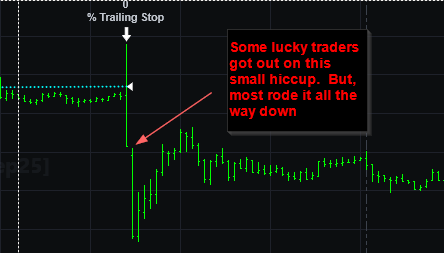
Come on – this is a 5-minute bar, right?  A lot of things can happen in five minutes.  I was a futures broker for many years and my rule of thumb during my tenure was you MAY get out at the low of the minute bar if there is a hiccup and your sell stop is blown.  Here is a one-minute chart.

Some orders were filled at the tick up on the 2nd minute bar.

My client wasn’t lucky this day and got filled near the low of the 2nd minute bar.  He was using a % trailing stop and when the high breached his threshold his protective stop was cancelled, and the new stop was implemented.  All this activity takes time.  And this strategy is professionally managed.

Why was this a perfect storm?

The report pop printed a new intraday high, likely tripping resting buy-stops and in this case pulling trailing protective stops tighter. Those sell-stops then fired into a thinning book after 4:00 p.m. ET, where Nasdaq futures liquidity is razor thin. Some orders were rejected or re-priced and ended up converting to market, worsening slippage. In this case, my client would have been better off if the trailing-stop threshold hadn’t been touched.

Electronic Trading and Fast Market Conditions and Not Held Order!

You believed the trade was up $400, but your day-end statement shows a loss of –$3,400. That disconnect usually comes from execution during a fast market. When your order is not held, the broker (or algo) has time/price discretion and no obligation to fill at a specific price. In a sudden air-pocket, quotes vanish and price gaps; the broker can’t predict the next print, so the only thing he can do is hit the first available liquidity. The result is slippage and a gaping difference between what is on the screen on what is in your pocket or the lack thereof.

A Stop Limit order can help during spikes or down drafts

This type of order is not universally available – especially when using algos.

A buy stop-limit order is a two-part order used to enter long above the market (or cover a short) with price control.

  • Stop price (trigger): When the market trades at or above this price, your order activates.

  • Limit price (cap): Once activated, the order becomes a limit buy at your limit price (or better). It will not pay more than the limit.

What should my client do in the future?

He tested his strategy over 15 years of data and felt secure enough to trade the system.  He knows that this market action could have just as easily gone in his favor.  Had the initial reaction carried on, he may have made a nice profit.  Should he augment his strategy to get out at the end of the day and then get back in – step over post-closing reports?  Maybe, but there is always the potential of slippage on this out and back in trade.  Also, you would need to use discretion as to when a handful of stocks controls the entire index.

Percent trailing stops only help if your profit trigger is meaningfully large and you’re willing to give back a realistic slice of that profit.

When a client shows me an equity curve that looks too good to be true, my first question is whether they’re using a percent trailing stop. I hope they say no—but usually it’s yes. Then I ask two things:

  1. What’s the profit threshold that arms the trail?

  2. How much are you willing to give back once it arms?

If the threshold is small and the give-back is ~20% or less, I know we’re in Best-Case Scenario Syndrome: backtests assume friendly fills. Platforms like TradeStation or MultiCharts will print a theoretical fill on every trade, but as we saw earlier, the gap between theory and actual can be huge.

You must accept that slippage is going to occur

If you don’t then you cannot trade.  You might come back at me and say: “Well, I will only use stop limit orders.”  That is great. but what about when exiting a trade.  “I will only develop a strategy that enters on limits – that way I can cut slippage in half.”  That is definitely a possibility.  “I will execute myself and forgo the convenience of algo order placement.”   Well, you better quit your day job and trade during the day.

Some EasyLanguage Functions Are Really “Classy”

The Series Function is very special

When a function accesses a previously stored value of one of its own variables, it essentially becomes a “series” function. Few programming languages offer this convenience out of the box. The ability to automatically remember a function’s internal state from one bar (or time step) to the next is known as state retention. In languages like Python, achieving this typically requires using a class structure. In Module #2 of my Easing into EasyLanguage Academy, I explained why EasyLanguage isn’t as simple as its name implies—yet this feature shows how its developers aimed to simplify otherwise complex tasks.

If you’ve ever worked with functions with memory that exchange data using a numericRef input, you’ve essentially been using a pseudo-class—a form of object-oriented programming in its own right. EasyLanguage includes a robust object-oriented library (with excellent resources by Sunny Harris and Sam Tennis – buy their book on Amazon), yet you’re confined to its built-in functionality since it doesn’t yet support user-defined class structures. Nonetheless, the series functionality combined with data passing brings you remarkably close to a true object-oriented approach—and the best part is, you might not even realize it.

Example of a Series Function

I was recently working on the Trend Strength indicator/function and have been mulling this post over for some time, so I thought this would be a good time to write about it.  The following indicator to function conversion will create a function of type series (a function with a memory.)  The name series is very appropriate in that this type of function runs along with the time series of the chart.  It must do this so it can reference prior bar values.

You can ensure a function is treated as a series function in two ways:

  1. Using a Prior Value:
    When you reference a previous value within the function, EasyLanguage automatically recognizes the need to remember past data and treats the function as a series function.

  2. Setting the Series Property:
    Alternatively, you can explicitly set the function’s property to “series” via a dialog. This instructs EasyLanguage to handle the function as a series function, ensuring that state is maintained across bars.

    Manually Set the Function to type Series

Importantly, regardless of the function’s name or even if it’s called within control structures (like an if construct), a series function is evaluated on every bar. This guarantees that the historical data is consistently updated and maintained, which is essential for accurate time series analysis.

Converting an indicator to a function

You can find a wide variety of EasyLanguage indicators online, though many are available solely as indicators. This is fine if you’re only interested in plotting the values. However, if you want to incorporate an indicator into a trading strategy, you’ll need to convert it into a function. For calculation-intensive indicators, it’s best to follow a standard prototype: use inputs for interfacing, perform calculations via function calls, and apply the appropriate plotting mechanisms. By adhering to this development protocol, your indicator functions can be reused across different analysis studies, enhancing encapsulation and modularity. Fortunately, converting an indicator’s calculations into a function is a relatively straightforward process. Here is indicator that I found somewhere.

Inputs: 
ShortLength(13), // Shorter EMA length
LongLength(25), // Longer EMA length
SignalSmoothing(7); // Smoothing for signal line
Vars:
DoubleSmoothedPC(0),
DoubleSmoothedAbsPC(0),
TSIValue(0),
SignalLine(0);
// Price Change (PC)
Value1 = Close - Close[1];
// First Smoothing (EMA of PC and |PC|)
Value2 = XAverage(Value1, LongLength);
Value3 = XAverage(AbsValue(Value1), LongLength);
// Second Smoothing (EMA of First Smoothed Values)
DoubleSmoothedPC = XAverage(Value2, ShortLength);
DoubleSmoothedAbsPC = XAverage(Value3, ShortLength);
// Compute TSI
If DoubleSmoothedAbsPC <> 0 Then
TSIValue = 100 * (DoubleSmoothedPC / DoubleSmoothedAbsPC);

// Compute Signal Line
SignalLine = XAverage(TSIValue, SignalSmoothing);
// Plot the TSI and Signal Line
Plot1(TSIValue, "TSI");
Plot2(SignalLine, "Signal");
TSI via Web

Now we can functionize it.

Below is an example of how you might convert an indicator into a function called TrendStrengthIndex. Notice that the first change is to replace any hard-coded numbers in the indicator’s inputs with parameters declared as numericSimple (or numericSeries where appropriate). This allows the function to accept dynamic values when called.  Not to give anything away, but you can also declare variables as numericRef, numericSeries, numericArrayRef, string, stringRef, and stringArrayRef.  Let’s not worry about these types right now.

inputs: 
ShortLength(numericSimple), // Shorter EMA length
LongLength(numericSimple), // Longer EMA length
SignalSmoothing(numericSimple); // Smoothing for signal line
Inputs must be changed to function nomenclature

Below is an example function conversion for the TrendStrengthIndex indicator.  The plot statements have been commented out since—rather than plotting—the function now passes back the calculated value to the calling program.

Vars:
DoubleSmoothedPC(0),
DoubleSmoothedAbsPC(0),
TSIValue(0),
SignalLine(0);
// Price Change (PC)
Value1 = Close - Close[1];
// First Smoothing (EMA of PC and |PC|)
Value2 = XAverage(Value1, LongLength);
Value3 = XAverage(AbsValue(Value1), LongLength);
// Second Smoothing (EMA of First Smoothed Values)
DoubleSmoothedPC = XAverage(Value2, ShortLength);
DoubleSmoothedAbsPC = XAverage(Value3, ShortLength);
// Compute TSI
If DoubleSmoothedAbsPC <> 0 Then
TSIValue = 100 * (DoubleSmoothedPC / DoubleSmoothedAbsPC);

// Compute Signal Line
SignalLine = XAverage(TSIValue, SignalSmoothing);
// Plot the TSI and Signal Line
//Plot1(TSIValue, "TSI"); commented out
//Plot2(SignalLine, "Signal"); commented out
TrendSTrengthIndex = TSIValue;
Functionalize It!

This works great if we just want the TrendStrengthIndex, but this indicator, like many others has a signal line.  The signal line for such indicators is usually a smoothed version of the main calculation.  Now you could do this smoothing outside the function, but wouldn’t it be easier if we did everything inside of the function?

Oh no!  I need to pass more than one value back!

If we just wanted to pass back TSIValue all we need to do is assign the name of the function to this value.

Passing values by reference

We can adjust the function to return multiple values by defining some of the inputs as numericRef. Essentially, when you pass a variable as a numericRef, you’re actually handing over its memory address—okay, let’s get nerdy for a moment! This means that when the function updates the value at that address, the calling routine immediately sees the change, giving the variable a kind of quasi-global behavior. Without numericRef, any modifications made inside the function stay local and never propagate back to the caller.  Not only is the function communicating with the calling strategy or indicator it is also remember its own stuff for future use.  Take a look at this code.

inputs: 
ShortLength(numericSimple), // Shorter EMA length
LongLength(numericSimple), // Longer EMA length
SignalSmoothing(numericSimple), // Smoothing for signal line

TrendStrength.index(numericRef), // Output
TrendStrength.signal(numericRef); //OutPut
Vars:
DoubleSmoothedPC(0),
DoubleSmoothedAbsPC(0),
SignalLine(0);

// Force series FUNCTION BEHAVIOR
Value4 = Value3[1];
// Price Change (PC)
Value1 = Close - Close[1];
// First Smoothing (EMA of PC and |PC|)
Value2 = XAverage(Value1, LongLength);
Value3 = XAverage(AbsValue(Value1), LongLength);

// Second Smoothing (EMA of First Smoothed Values)
DoubleSmoothedPC = XAverage(Value2, ShortLength);
DoubleSmoothedAbsPC = XAverage(Value3, ShortLength);
// Compute TSI
If DoubleSmoothedAbsPC <> 0 Then
TrendStrength.index = 100 * (DoubleSmoothedPC / DoubleSmoothedAbsPC);

// Compute Signal Line
TrendStrength.signal = XAverage(TrendStrength.index, SignalSmoothing);

TrendStrengthIndex = 1;
Is this a function or is it a class?

There is a lot going on here.  Since we are storing our calculations in the two numericRef inputs, TrendStrength.index and TrendStrength.signal the function name can simply be assigned the number 1.  You only need to do this because the function needs to be assigned something, or you will get a syntax error.  Since we are talking objects, I think it would be appropriate to introduce “dot notation.”  When programming with objects you access the class members and methods buy using a dot.  If you have an exponential moving average class in python you would access the variables and functions (methods) in the class like this.

class ExponentialMovingAverage:
# Class-level defaults serve as initial values.
alpha = 0.2 # Default smoothing factor
ema = None # EMA starts as None

def update(self, price):
"""
Update the EMA with a new price.

Parameters:
price (float): The new price to incorporate.

Returns:
float: The updated EMA value.
"""
# If ema is None, this is the first update
if self.ema is None:
self.ema = price
else:
self.ema = self.alpha * price + (1 - self.alpha) * self.ema
return self.ema

# Create an instance of the class.
ema_calculator = ExponentialMovingAverage()

# Dot notation to access the class attribute.
print("Alpha value:", ema_calculator.alpha)

# Dot notation to access the EMA attribute before any updates.
print("Initial EMA (should be None):", ema_calculator.ema)

# Dot notation to call the update method.
ema_value = ema_calculator.update(10)
print("EMA after update with 10:", ema_value)
Using dot notation to extract values from a class

Since you are using EasyLanguage and a series function, you don’t have to deal with something like this.  On the surface this looks a little gross but coming from a programming background this is quite eloquent.  I only show this to demonstrate dot notation.  In an attempt to mimic dot notation in the EasyLanguage function, I simply add a period ” , ” to the input variable names that will return the numbers we need to plot.  Take a look at the nomenclature I am using.

    TrendStrength.index(numericRef), // Output
TrendStrength.signal(numericRef); //OutPut
Function Name +

I am using the function name a ” . ” and an appropriate variable name.  This is not necessary.  Historically, input names that were modified within a function were preceded by the letter “O.”  In this example, Oindex and Osignal.  This represented “output.”  Remember these naming conventions are all up to you.  Here is the new indicator using our EasyLanguage “Classy” function and our pseudo dot notation nomenclature.

//Utilize the TrendStrengthIndex classsy function

inputs: shortLength1(9), longLength1(19), signalSmoothing1(9);
inputs: shortLength2(19), longLength2(39), signalSmoothing2(13);

vars: trendStrength1.index(0), trendStrength1.signal(0);
vars: trendStrength2.index(0), trendStrength2.signal(0);
value1 = TrendStrengthIndex(shortLength1,longLength1,signalSmoothing1,trendStrength1.index,trendStrength1.signal);
value2 = TrendStrengthIndex(shortLength2,longLength2,signalSmoothing2,trendStrength2.index,trendStrength2.signal);


plot1(trendStrength1.index,"TS-Index-1");
plot2(trendStrength1.signal,"TS-Signal-1");

plot3(trendStrength2.index,"TS-Index-2");
plot4(trendStrength2.signal,"TS-Signal-2");
Take a look at how we access the information we need from the function calls.

You might be surprised to learn that you may have been doing object-oriented programming all along without realizing it. Do you prefer the clarity of dot notation for accessing function output, or would you rather stick with a notation that uses a big “O” combined with the input name to represent functions with multiple outputs? Also, notice how each function call behaves like a new instance—the internal values remain discrete, meaning that each call remembers its own state independently.  In other words, each function call remembers its own stuff.

Two distinct function values from the same function – called twice on the same bar.

Use Python and ChatGPT to fill the gaps of TradeStation

Merge Equity Curves 2.0

Exporting Strategy Performance XML files that use 15 years of 5-minute bars can be cumbersome.  Using Maestro can be cumbersome too.   I know there are great programs out there that will quickly analyze the XML files and do what we are about to do plus a bunch more.  But if you want to do it yourself, try working with 224,377 KB files.

If you want to do a quick merge of equity curves of different markets or systems use this simple method.   That is if you have Python, MatPlotLib and Pandas installed on your computer.  Installing these are really simple and everybody is doing it.   I created this script with the help of a paid version of ChatGPT.

Using Python et al. to plot combined equity curve.

Steps:

1,)  Create a folder on you C drive:  C:\Data

2.)  Put this code into your strategy code.  Make sure you change the output file name for each market/system combo that the strategy is applied to.

if t = sessionEndtime(0,1) then
begin
print(file("C:\Data\Sysname-NQ.csv"),d+19000000:8:0,",",netProfit + Openpositionprofit);
end;
Code snippet to output daily equity

This will create a csv file that looks like this.

20100201,1960.00
20100202,2790.00
20100203,2330.00
20100204,-2290.00
20100205,-3740.00
20100208,-3970.00
20100209,-2360.00
20100210,-3020.00
20100211,-630.00

3.)  Copy and paste the following code into your favorite Python IDE or IDLE.

import tkinter as tk
from tkinter import filedialog
import pandas as pd
import matplotlib.pyplot as plt
import os

def extract_market_name(filename):
"""Extracts the market name from the filename formatted as 'system-market.csv'."""
return os.path.splitext(filename)[0].split('-')[-1]

def load_equity_data(files):
"""Loads and aligns equity data from multiple CSV files."""
data_dict = {}

for file in files:
market = extract_market_name(os.path.basename(file))
df = pd.read_csv(file, header=None, names=["Date", market], dtype={0: str, 1: float})
df["Date"] = pd.to_datetime(df["Date"], format='%Y%m%d')
data_dict[market] = df.set_index("Date")

combined_df = pd.concat(data_dict.values(), axis=1, join='outer').fillna(method='ffill').fillna(method='bfill')
combined_df["Total Equity"] = combined_df.sum(axis=1)
return combined_df

def calculate_metrics(equity_curve):
"""Calculates total profit and maximum drawdown from the equity curve."""
total_profit = equity_curve.iloc[-1] - equity_curve.iloc[0]
peak = equity_curve.cummax()
drawdown = peak - equity_curve
max_drawdown = drawdown.max()
return total_profit, max_drawdown, drawdown

def calculate_correlation(df):
"""Calculates and prints the correlation matrix of equity curves."""
correlation_matrix = df.corr()
print("\n--- Correlation Matrix ---")
print(correlation_matrix.to_string())
print("\n--------------------------")

def plot_equity_and_drawdown(df, drawdown):
"""Plots the combined equity curve and drawdown as separate subplots."""
fig, ax = plt.subplots(2, 1, figsize=(12, 8), sharex=True)

# Plot equity curves
ax[0].set_title("Equity Curve")
ax[0].set_ylabel("Equity Value")
for column in df.columns[:-1]: # Exclude "Total Equity"
ax[0].plot(df.index, df[column], linestyle='dotted', alpha=0.6, label=f"{column} (Individual)")
ax[0].plot(df.index, df["Total Equity"], label="Total Equity", linewidth=2, color='black')
ax[0].legend()
ax[0].grid()

# Plot drawdown
ax[1].set_title("Drawdown")
ax[1].set_xlabel("Date")
ax[1].set_ylabel("Drawdown Amount")
ax[1].plot(drawdown.index, drawdown, color='red', linestyle='solid', alpha=0.7, label='Drawdown')
ax[1].fill_between(drawdown.index, drawdown, color='red', alpha=0.3)
ax[1].legend()
ax[1].grid()

plt.show()

def main():
root = tk.Tk()
root.withdraw()
files = filedialog.askopenfilenames(title="Select Equity Files", filetypes=[("CSV files", "*.csv")])

if not files:
print("No files selected.")
return

combined_df = load_equity_data(files)
total_profit, max_drawdown, drawdown = calculate_metrics(combined_df["Total Equity"])

print("\n--- Performance Metrics ---")
print(f"Total Profit: {total_profit:.2f}")
print(f"Maximum Drawdown: {max_drawdown:.2f}")
print("--------------------------")

calculate_correlation(combined_df.drop(columns=["Total Equity"]))
plot_equity_and_drawdown(combined_df, drawdown)

if __name__ == "__main__":
main()
Equity Curve Merge Python Script

4.)  Run it and multi-select all the system/market .csv files

5.)  Examine the results:

Combined equity, maximum draw down, and correlation matrix

How did I get ChatGPT to code this for me.

I pay $20 a month for Chat and it learns from my workflows.  The more I work with it, the more it knows my end goals to the scripts I am asking it to create.

Here are the prompts I provided Chat:

I want the user to be able to use tkinter to select multiple files that contain two columns: 1-date in yyyymmdd format and 2 – the equity value for that date. The filename consists of the system name and the market name and follows the following patterm: system name”-“market name”.csv”. I need you to extract the market from the filename. If the filename is “Gatts-GC.csv”, the market name is “GC.” Once all the files are opened, I need you to align the dates and create a combined equity curve. We can do this in matplotlib if you like. I need you to calculate the total profit and the maximum drawdown among the combined equity curves.

[SCRIPT FAILED]

My data does not included headers. The first column is the date in yyyymmdd with no separators and the second column is a float value. I think your pandas are having a hard time interpreting this

[SCRIPT WORKED]

That is perfect. Can we had a correlation analysis to the equity curves and print that out too.

[SCRIPT WORKED]

Can we plot the draw down on the same canvas as the equity curves?

[SCRIPT WORKED]

Could we put the draw down in a subplot instead of in the profit plot?

[FINAL SCRIPT] Look above

Am I Worried About Being Replaced by Chat GPT?

With Python and its data visualization libraries and EasyLanguage you can overcome some of the limitations of TradeStation.  And of course, ChatGPT.  I have been programming in Python for nine years now and I am very good at base Python.  However, Pandas are still a mystery to me and interfacing with MatPlotLib is not super simple.   Does it frustrate me that I don’t know exactly what ChatGPT is coding?  Yes, it did at first.  But now I use it as a tool.  I may not be coding the Python, but I am managing ChatGPT through my well thought out prompts and my feedback.  Does my knowledge of Python help streamline this process? – I think it does.  And I have trained ChatGPT during the process.  I am becoming a manager-programmer and ChatGPT is my assistant.

RMI Trend Sniper in EasyLanguage

RMI Trend Sniper Indicator – Described on ProRealTime in PR Code.

RMI Trend Sniper Indicator – Indicators – ProRealTime

RMI Trend Sniper: An Innovative Trading Indicator

The following is from the RealCode website – I have just copied and pasted this here.  Here is the header information that provides credit to the original programmer.

//PRC_RMI Trend Sniper
//version = 0
//26.03.24
//Iván González @ www.prorealcode.com
//Sharing ProRealTime knowledge

Here is the description of the Indicator via ProRealCode.  Please check out the website for further information regarding the indicator and how to use it.

The RMI Trend Sniper indicator is designed to identify market trends and trading signals with remarkable precision.

This tool combines the analysis of the Relative Strength Index (RSI) with the Money Flow Index (MFI) and a unique approach to range-weighted moving average to offer a comprehensive perspective on market dynamics.

Configuration and Indicator Parameters

The RMI Trend Sniper allows users to adjust various parameters according to their trading needs, including:

  • RMI Length: Defines the calculation period for the RMI.
  • Positive and Negative Momentum (Positive above / Negative below): Sets thresholds to determine the strength of bullish and bearish trends.
  • Range MA Visualization (Show Range MA): Enables users to visualize the range-weighted moving average, along with color indications to quickly identify the current market trend.

Cool Shading – right?

Many of my clients ask me to convert indicators from different languages.  One of my clients came across this from ProRealCode and asked me to convert for his MulitCharts.  Pro Real code is very similar to EasyLanguage with a few exceptions.  If you are savvy in EL, then I think you could pick up PRC quite easily.  Here it is.  It is a trend following indicator.  It is one of a few that I could not find the Easylanguage equivalent so I thought I would provide it.  Play around with it and let me know what you think.  Again, all credit goes to:

//Iván González @ www.prorealcode.com
//Sharing ProRealTime knowledge


inputs:Length(14),//RMI Length
pmom(66),//Positive above
nmom(30);//Negative below

//-----RSI and MFI calculation-----------------------------//

vars: alpha(0),src1(0),src2(0),up(0),down(0),myrsi(0),seed(True);

alpha = 1/length;
//-----Up
src1 = maxList(close-close[1],0);
if seed then
up = average(src1,length)
else
up = alpha*src1 + (1-alpha)*up[1];

//-----Down
src2 = -1 * minList(close-close[1],0);
if seed then
down = average(src2,length)
else
down = alpha*src2 + (1-alpha)*down[1];

seed = False;

//-----Rsi
if down = 0 then
myrsi = 100
else if up = 0 then
myrsi = 0
else
myrsi = 100 - (100/(1+up/down));
vars: mfiVal(0),rsimfi(0),bpmom(False),bnmom(False),positive(0),negative(0),ema(0);
//-----MFI
mfiVal = moneyFlow(length);
//-----RsiMfi
rsimfi = (myrsi+mfiVal)/2;
//----------------------------------------------------------//
//-----Long Short Conditions--------------------------------//
ema = average(c,5);

bpmom = rsimfi[1] < pmom and rsimfi > pmom and rsimfi > nmom and (ema-ema[1])>0;
bnmom = rsimfi<nmom and (ema-ema[1])<0;

if bpmom then
begin
positive = 1;
negative = 0;
end
else if bnmom then
begin
positive = 0;
negative = 1;
end;

//----------------------------------------------------------//
//------Calculate RWMA--------------------------------------//
vars: band(0),band20(0),barRange(0),weight(0),sum(0),twVal(0),rwma(0);

band = minList(avgtruerange(30)*0.3,close*(0.3/100));
band20 = band[20]/2*8;
barRange = high-low;

weight = BarRange/summation(BarRange,20);
sum = summation(close*weight,20);
twVal = summation(weight,20);
rwma = sum/twVal;

vars: r(0),g(0),b(0);

if positive = 1 then
begin
rwma = rwma-band;
r=0;
g=188;
b=212;
end
else if negative = 1 then
begin
rwma = rwma+band;
r=255;
g=82;
b=82;
end
else
rwma = 0;

//------------------------------------------------------------//
//-----Calculate MA bands-------------------------------------//
vars: mitop(0),mibot(0);

mitop = rwma+band20;
mibot = rwma-band20;


plot1(mitop,"TOP");
plot2((mitop+mibot)/2,"TOP-BOT");
plot3((mitop+mibot)/2,"BOT-TOP");
plot4(mibot,"BOT");
if positive = 1 then
begin
plot5(rwma,"Pos",GREEN);
noPlot(plot4);
end;
if negative =1 then
begin
plot6(rwma,"Neg",RED);
noPlot(plot3);
end;
Ignore the RGB Color Codes


Getting Creative to Shade Between Points on the Chart

TradeStation doesn’t provide an easy method to do shading, so you have to get a little creative.  The plot TOP is of type Bar High with the thickest line possible.  The plot TOP-BOT (bottom of top) is of type Bar Low.  I like to increase transparency as much as possible to see what lies beneath the shading . The BOT-TOP (top of bottom) is Bar High and BOT is Bar Low.  Pos and Neg are of type Point.  I have colored them to be GREEN or RED.

Indicator Settings.

Happy New Year!