Is Your System Broken?

The Ultimate Test of Efficacy: Time

At Futures Truth, we focused on one thing: walk-forward results across hundreds of trading systems. Back then, the industry was unrecognizable compared to today—if you can even call what exists now an “industry.”

Just this morning, I was reminiscing about vendors who sold strategies for upwards of $5,000. Those packages usually consisted of a set of rules (disclosed or not) and a rudimentary DOS-based program to generate simple charts and next-day orders. This was well before the heyday of TradeStation; those days are gone forever, for better or worse.

Back then, if a system performed well in walk-forward analysis, it earned a ranking. In those days, a Futures Truth ranking meant something. Sometimes, however, that ranking felt like a curse. Critics even argued you could “fade” a top-ranked system and make more money by taking the opposite trade. The reality is that many of those legendary “Top Ten” systems—built for a different era—simply wouldn’t survive in today’s markets.

Side Bar:  There are still services such as Striker and The Collective that still monitor trading systems.  Striker only shows real execution, which is mostly a good thing – real execution costs are shown.  But so is broker error.  Heck, we are all human and we all make mistakes.  Striker is upfront with this, and they state they will do the best they can – execution can be a beast. 

Speaking of execution – The Sunday Evening Gap

A Traders Nightmare. Most likely Trend Followers were short during the huge gap here!

 Imagine, having a stop order in crude oil on a Sunday evening when the market opens thousands of dollars through your stop.  If a system derived position is short the broker’s only directive is to GET OUT – no matter what, at the first off ramp.  The above chart shows a single contract slip on crude futures at the genesis of the Iran War.

The Million-Dollar Question

The second most common question I was asked at Futures Truth was: “How do I know if the system I’m trading is broken?”

Can you guess the most common one? “If it were your money, which system would you trade?”

We never answered that one directly; there was never a simple black-and-white answer. But the second question—the one about “broken” systems—usually surfaced when a trader was deep in a drawdown.

Seasoned traders know that systems ebb and flow; drawdown is simply the “tax” we pay to play the game. Others, however, get “married” to a system and stick with it until “death do us part.” My standard response back then was always:

“Is your current performance still within the boundaries of the backtest?”

In other words, has the system exceeded its historical maximum drawdown by a meaningful margin? Does the current real-time performance look like other “rough patches” in the historical equity curve? If the answer was yes, the trader would usually give it a little more room.

Into Unexplored Waters

Those were simpler days, but the core problem remains: we cannot see the future. No forward analysis can tell you with certainty what a trading system will do next. What it can do is tell you when the system has moved into “unexplored waters.” Once you know that, the decision to stay, abandon, or pause becomes much easier.

All trading systems oscillate between success and failure. If a system has a genuine technical edge, that edge may eventually reassert itself—provided you have the time and capital to wait. But most traders don’t have unlimited resources.

Recently, the market activity surrounding the Iran conflict has pushed many systems into intense drawdowns. The same old questions have reared their heads again. This time, however, I wanted to provide a more empirically derived analysis. I’ve developed a disciplined approach to measuring risk and reward that moves beyond “gut feel.”

To illustrate, I pulled a system off my shelf that I originally designed for retail consumption back in June 2018. Here is how it’s currently holding up:

Hypothetical Results: Before and after development.

The Profit Mirage

This is a mean-reversion approach. I remember thinking back in 2018: How much longer can this bull market continue? With that in mind, I utilized a simple regime filter. After just a few weeks of trading later that year, I genuinely thought the system might be broken. The market spent a large portion of that fall and winter below its 200-day moving average, and shorting simply wasn’t working.

The system then went dormant for a long stretch, finally “waking up” at the height of the pandemic. Had you stuck with it, you would be up significantly today (though we stopped trading right at the onset of the pandemic).

But here is the catch: Profit, by itself, is not enough to determine if a system is broken. As long as they are making money, most traders never bother to peek below the surface. This system would likely be sitting near the top of the Futures Truth rankings today. But let’s dive in and see how it actually performed on its “test of time.”

Test 1 – Baseline Projection

Baseline projection based on in sample average monthly return.

Is Outperformance Always a Good Thing?

Looking at the chart above, you see a steep deviation below the baseline initially, followed by a rocket-ship move to the upside. By late 2025, the actual equity is sitting way above the red dashed expectation line.

Most traders would see this and think they’ve struck gold. “Isn’t this what we want—a strong positive deviation?” they’d ask.

In a world of simple “bottom-line” thinking, the answer is yes. But in the world of professional algorithmic trading, this chart is screaming a different story. To a seasoned developer, deviation is deviation. Whether it’s to the upside or downside, moving this far away from the “expected” path suggests that the strategy’s original statistical model is no longer in control.

When a system starts generating 190% of its expected return, it’s often because it has inadvertently stepped into a high-volatility regime it wasn’t designed to navigate. If the “upside” is this aggressive, you can bet the “downside” risk has scaled right along with it.

Test 2:  Monte Carlo Analysis on Walk Forward

Return and Drawdown sitting on the tails.

The Statistical Reality Check

To understand why I called this system “Degraded” despite the profits, we have to look at the Monte Carlo Walk Forward distributions. This is where we compare real-time performance against thousands of simulated “alternate realities” based on the system’s history.

1. The Equity Distribution (The Good News… or is it?)

In the top chart, our actual forward equity of $67,575 (the dashed red line) sits at the 97th percentile.

  • Interpretation: Out of 1,000 possible outcomes, the system performed better than 970 of them. While this looks great, being this far out on the “tail” of the distribution suggests we are no longer operating in a normal environment.

2. The Drawdown Distribution (The Warning)

The bottom chart is the real story. The actual worst drawdown reached $18,588, placing it in the 98th–99th percentile of severity.

  • The Comparison: The median expected drawdown was only $8,125.

  • The Verdict: We have blown past the 90th percentile of $13,611 and are deep into the “danger zone.”

The Bottom Line

When a system hits the 97th percentile for gains but simultaneously hits the 99th percentile for drawdown stress, the math is telling you that the character of the strategy has changed. You aren’t just trading a system in a “rough patch”—you are trading a system that has moved into a risk regime it was never built to survive. This is the “evidence-based framework” I mentioned earlier. Without these charts, you’re just guessing. With them, you have the data to justify stepping aside.

The Verdict: Test 3 – Overall Assessment

This is where the “gut feel” ends and empirical analysis begins. The following commentary is generated by my new software; a quasi-expert system designed to pair raw statistical results with descriptive, actionable interpretation.

Status: DEGRADED

Risk Assessment: CRITICAL RISK

Incubation/Trading Readiness Score: 4 / 8

Overall Assessment: Degraded
Risk Assessment: Critical Risk
Incubation/Trading Readiness Score: 4 / 8
Return delivery is running ahead of baseline: expected annual return is 18% versus actual annual return of 34% and expected annual gain of $4,477 compares with actual annual gain of $8,536. However, that stronger return delivery has come with a less stable path and/or materially heavier risk than history would suggest. Risk is materially worse than the historical profile: actual worst drawdown of $18,588 is 2.670 times the historical drawdown of $6,962. Risk conditions are now in the Critical Risk range. The realized monthly path is poorly aligned with the baseline, based on monthly equity correlation of 0.960, projection RMSE of $21,789, normalized RMSE of 4.867, and path wander ratio of 0.621. Correlation still describes directional similarity, but RMSE and path wander ratio show how far the realized path has wandered from projection over the same window. Monte Carlo context is cautionary: actual forward equity is $67,575, gain percentile is 97% (near the top of the simulated distribution), and drawdown percentile is 99% (in the worst decile for drawdown stress). Taken together, the system shows meaningful deterioration in incubation.

A readiness reading of 4 out 8 indicates this system right now has degraded to a point where caution and I mean extreme caution should be used in your decision to trade this strategy.  The major factors influencing rating are:

  • Return Attainment:   1.907 – — This indicates the system has achieved 190.7% of its historically expected return during the incubation/trading period. In practical terms, the strategy is generating returns at nearly twice the pace implied by its historical baseline.
  • Path Wander Ratio: 0.621 — This indicates that the actual equity path is deviating from the projected path by a meaningful amount relative to the total expected move over the incubation/trading period. Put simply, the system is not wildly off course, but it is no longer tracking the historical baseline tightly.
  • Drawdown Stress: 2.67 — This indicates that the actual worst drawdown has expanded to roughly 2.7 times the level suggested by the system’s historical baseline. Put simply, the strategy may still be generating return, but it is doing so while absorbing far more pain than its historical profile would justify.

Hindsight is always 20/20, and it is easy to say now that you should have stuck with the system. But with a large sample of out-of-sample trades showing this degree of deterioration, if I had to choose between staying with it, abandoning it entirely, or temporarily shutting it down, I would probably step aside and wait for conditions to settle down. Remember, not trading is an algorithm too.   Having the right tools to make this kind of decision is paramount, because they give you an evidence-based framework for explaining and defending your reasoning.

The Power of Incubation: Is Your Best System Collecting Dust?

How many systems do you have sitting on your shelf? I personally have at least a hundred, probably more. In this business, a little dust is not always a bad thing.

Figuratively speaking, the more “dust” a system has collected, the more real-time incubation it has endured. And that gives you something far more valuable than any backtest: pure, unadulterated out-of-sample evidence.

Seeds Waiting to Be Planted

Algorithmic trading development rarely produces just one system. It creates a trail of offshoots—versions that may have looked unremarkable or even mediocre during the initial build. Yet many of these forgotten systems are really just seeds waiting for the right environment.

When you revisit them months or even years later, you may find that a strategy which struggled in 2022 has bloomed into a powerhouse in 2026. Without a framework to measure that growth, you would never know.

Why You Need an Incubation Framework

Most traders revisit old systems by simply eyeballing an equity curve. An incubation framework goes much deeper by providing:

Historical Context: Does the dusty system’s recent performance still match its original DNA?

Regime Readiness: Has the market finally moved into the regime this offshoot was designed for?

The Go/No-Go Signal: A quantitative way to decide whether a seed is finally ready to be moved from the shelf to the server.

TS-SystemChecker software

TS-System Check Control Panel

A Tool Built for the Journey

I built TS-SystemChecker because, after decades at Futures Truth and years of developing my own strategies, I needed a better way to cut through the emotional fog that surrounds system evaluation.
I didn’t design TS-SystemChecker to be a black box or some kind of get-rich-quick shortcut. I built it because, after decades at Futures Truth and years of developing my own strategies, I wanted a better way to cut through the emotional fog that surrounds system evaluation.

Whether you are a retail trader focused on refining one core system, or a developer like me with a shelf full of offshoots, this framework was built for that journey.

For the specialist: If you have one system you live and die by, the deep-dive analysis helps define its boundaries of truth. You can begin to see whether a drawdown is simply part of the system’s normal character or evidence of something more structural.

For the portfolio manager: If you are tracking a library of ideas, the Batch Analysis feature helps you monitor many systems at once. Import the trade files, review the evidence, and identify which seeds may finally be ready to move from the shelf to a live account.

Looking Beneath the Surface

At the end of the day, this is why I built TS-SystemChecker. Traders need more than opinions, hope, or fear. They need a framework grounded in evidence.

That is the real purpose of this tool: not to make decisions for you, but to help you make better ones.

TS-SystemChecker Batch Mode

Generated Code Is Not the Same as Engineered Code

AI can write structure, but experienced programmers still supply the craft

The more we rely on generated code, the more disciplined we must become in questioning it.

AI and modern frameworks now provide valuable insights that, just a few years ago, would have required significant time and effort to obtain. However, while they offer tremendous macro-level leverage, they can also introduce subtle assumptions that lead to impossible scenarios and misleading downstream analysis. This is especially true in environments designed for rapid idea testing, where convenience can come at the expense of deeper, microscopic introspection.

For example, in my PatternSmasher framework, I use constructs like BarsSinceEntry to control trade duration and evaluate pattern efficacy. This makes it very easy to test thousands of ideas quickly. But that convenience comes with a responsibility. If you rely on these abstractions without thinking through the details, you can end up with behavior that looks perfectly valid in code but could never occur in the real world.

I have seen this problem in other frameworks and in AI-generated code as well. This is why it is so important to continue to hone your craft and take a deep dive into the results produced by generated code. In the quant world, the first step is to study the trades and isolate problems such as what I call simultaneous same-direction exit and reentry. Once you see it, the job is to fix it without changing the intent of the algorithm.

Let me show you exactly what I mean. The logic behind this example looks perfectly fine on the surface. But when you dig into the trades, you see the problem immediately. In this chart, the system exits a long position and then turns right around and buys again at the same time and price. That is not a reversal. It is a same direction exit and reentry that simply cannot happen in the real world, and it pollutes the back test with trades that should not exist.

Example of simultaneous same-direction exit and reentry at the same time and price—an impossible trade sequence that distorts backtest results – 640 minute bar on Gold – why 640?

We entered a long position, the trade expired, immediately re-entered on the next setup, that trade expired as well, and then entered again—only to get stopped out. That’s three round turns, each incurring commission and slippage.

// Simple code that is of course mean reversion.
// However, since we seem to be in this regime
// let's hone our craft to make this work as intended.

input:movAvgLen(50),consCloses(1),exitAfterNBars(5),stopLoss(3000);

value1 = countIF(c < c[1],consCloses);
value2 = countIF(c > c[1],consCloses);


if value1 = consCloses and close > average(c,movAvgLen) then
buy ("lentry") next bar at open;
if value2 = consCloses and close < average(c,movAvgLen) then
sellShort ("sentry") next bar at open;


if barsSinceEntry > exitAfterNBars then
Begin
sell("lx-exp") next bar at open;
buyToCover("sx-exp") next bar at open;
end;
setStopLoss(stopLoss);
Simple entry with expiration exit

The code that produced this looks pretty clean. You have your entry logic, a BarsSinceEntry exit, and a stop loss. On the surface, everything seems fine.

But you don’t find this kind of problem by staring at the code. You find it by looking at the trades.  This is the one thing AI or a framework doesn’t examine.  At first, the natural reaction is to slap a MarketPosition “gate” on the entry logic. The word “gate” may be a dead giveaway that AI has influenced the discussion. But I like it. It has been around since the early days of electrical circuits, and it is very appropriate here.  I’ve noticed that many of the words AI uses have started to creep into my own vocabulary. Funny how that happens.

Fix #1

input:movAvgLen(50),consCloses(1),exitAfterNBars(5),stopLoss(3000);

value1 = countIF(c < c[1],consCloses);
value2 = countIF(c > c[1],consCloses);


if marketPosition <> 1 and
value1 = consCloses and close > average(c,movAvgLen) then
buy ("lentry") next bar at open;

if marketPosition <> -1 and
value2 = consCloses and close < average(c,movAvgLen) then
sellShort ("sentry") next bar at open;


if barsSinceEntry > exitAfterNBars then
Begin
sell("lx-exp") next bar at open;
buyToCover("sx-exp") next bar at open;
end;
setStopLoss(stopLoss);
Fix #1 - solves the simultaneous exit and re-entry same direction glitch

So what does that MarketPosition “gate” actually do?

It fixes the symptom. The same-bar exit and reentry disappears, and the trades look cleaner.

But it also changes the algorithm in a much deeper way.

In the original design, a new long signal while already long reaffirmed the position and should have kept the trade alive. The gate removes that behavior. Now the strategy must exit first and then wait until the next bar to reenter.

And that delay matters.

By the time the next bar arrives, the setup may be gone. What should have been one continuous trade is now split into pieces—or missed entirely.

You didn’t just clean up the trades. You changed which trades exist.  The new strategy more or may not be more efficient, but just know the algorithm is now different.

Fix #2

We bought, suppressed the expiration exit due to a new buy setup—twice—and were ultimately stopped out at the level where the stop loss from the final trade that didn’t occur—but whose properties we were monitoring—would have been triggered.

Could most quants who aren’t programmers solve this riddle? Probably not. My 40 years of programming experience certainly played a role, and my familiarity with EasyLanguage—especially its limitations—helped guide me down the right path. But more importantly, I was able to recognize the nature of the problem, apply targeted fixes, and then analyze the resulting trades. I repeated this process—wash, rinse, repeat—until the issue was resolved.

Much of the knowledge I relied on has been documented by myself and others over the years. Investing time in books, videos, and webcasts specific to your programming language remains essential—it forms the foundation. But ultimately, refining your own skills and developing your craft is a time-consuming process that pays lasting dividends.

Groundwork for the Fix

Solving what initially appears to be a simple riddle requires recognizing several underlying behaviors. I was able to correct the issue because I could anticipate when a new trade was about to occur. When both the exit gate for an existing position and the entry gate for a new position in the same direction were simultaneously open, I prevented the transition by closing both gates.

However, simply blocking the transition was not enough. I had to simulate the trade that would have occurred. This meant marking the hypothetical entry price, resetting the stop-loss based on that price, and reinitializing my own bars-in-trade counter.

At this point, I could no longer rely on EasyLanguage’s built-in functions such as BarsSinceEntry or SetStopLoss. Those functions assume an actual executed trade and therefore could not reflect the internal state I needed to maintain. To solve the problem correctly, I had to take full control of trade state management and explicitly track these values myself.

input:movAvgLen(50),consCloses(1),exitAfterNBars(5),stopLoss(3000);

vars: mp(0),barsMult(1),barsIntrade(0),lStopLevel(0),sStopLevel(0),closedTrades(0);
vars: canGoLong(False),canGoShort(False);

canGoLong = countIF(c < c[1],consCloses) = consCloses and close > average(c,movAvgLen) ;
canGoShort = countIF(c > c[1],consCloses) = consCloses and close < average(c,movAvgLen);

mp = marketPosition;

//Exit Technology

closedTrades = totalTrades;
//long exit on bar after entry
if mp[1] <> mp and mp = 1 or (closedTrades > closedTrades[1]) Then
begin
barsInTrade = 0;
lStopLevel = open[0] - stopLoss/bigPointValue ;
end;

//short exit on bar after entry
if mp[1] <> mp and mp = -1 or (closedTrades > closedTrades[1]) Then
begin
barsInTrade = 0;
sStopLevel = open[0] + stopLoss/bigPointValue ;
end;

//long reentry stop reset
if mp = 1 and canGoLong and barsInTrade > exitAfterNBars Then
begin
lStopLevel = open of tomorrow - stopLoss/bigPointValue ;
// print(d," ",t," should exit and renter long tomorrow ",barsInTrade," ",barsSinceEntry," ",open of tomorrow);
barsInTrade = -1;
end;

//short reentry stop reset
if mp = -1 and canGoShort and barsInTrade > exitAfterNBars Then
begin
sStopLevel = open of tomorrow + stopLoss/bigPointValue ;
// print(d," ",t," should exit and renter short tomrorrow ",barsInTrade," ",barsSinceEntry," ",open of tomorrow);
barsInTrade = -1;
end;

if mp = 1 then
sell("lx-stopLoss") next bar at lStopLevel stop;

if mp = -1 then
buyToCover("sx-stopLoss") next bar at sStopLevel stop;

//Entry Logic
if canGoLong then
buy ("lentry") next bar at open;
if canGoShort then
sellShort ("sentry") next bar at open;


//Bars in trade expiration exit
if barsInTrade > exitAfterNBars then
Begin
sell("lx-exp") next bar at open;
buyToCover("sx-exp") next bar at open;
end;

//Day of entry protection
setStopLoss(stopLoss);
//Increment barsInTrade - mimic TradeStation here too!
if mp <> 0 then barsInTrade = barsInTrade + 1;
Fix #2 - difficult initially but reusable

This version fixes the problem by taking control of the trade state instead of relying on EasyLanguage’s built-in functions.

First, I define whether I can go long or short, independent of my current position. Then I track my own state variables—market position, bars in trade, stop levels, and trade count—so I know exactly what the system is doing at all times.

The key occurs when a same-direction signal appears after the trade has technically expired. Instead of allowing an exit and immediate reentry, I suppress both actions and simulate the renewed trade. I mark the hypothetical entry price, reset the stop based on that level, and restart my bars-in-trade counter.

Because of this, I can no longer rely on BarsSinceEntry or SetStopLoss—they depend on actual trades. I manage everything explicitly.

The result is a continuous position that preserves the original intent of the algorithm without introducing impossible trades into the backtest.

EasyLanguage also has its share of esoteric nuances. Code order can matter in some places and not in others, particularly with order execution. Even detecting position changes requires a bit of finesse. These details matter, but they are beyond the scope of this discussion.

This is where the difference between generated code and engineered code becomes clear.

A programmer who is not willing to put in the work—and instead relies on AI to solve the problem—will likely stop at the first acceptable fix. The code will run, the trades will look cleaner, and the issue will appear resolved. But the deeper problem remains: the structure has changed, trades may be missing, and the original intent of the algorithm has been compromised.

As we become more dependent on code generation through AI and frameworks, it becomes even more important to validate that the output is reasonable and reflects something that could occur in the real world. That responsibility does not go away—it increases. And it requires us to continue honing our craft.

AI can generate code and even suggest reasonable fixes, but it does not truly understand the nuances of the language, the sequencing of events, or the intent behind the strategy. It cannot look at a trade and say, “that shouldn’t have happened.” It does not debug by questioning reality—it follows patterns.

Arriving at the correct solution required recognizing the problem, iterating through possible fixes, examining the trades, and refining the logic until the behavior matched the intent. That process—wash, rinse, repeat—is the craft.

Generated code can get you started. Engineered code is what gets you to the truth.  Take a look at the two following reports.  Similar results, but look at the number of trades and those statistics tied to this number.


Monte Carlo: Garbage or Gold?

A quick history of Monte Carlo (the short version)


Monte Carlo Tool Link:  Read blog first:  Monte Carlo Trade Flight Simulator · Streamlit

Youtube Video on Monte Carlo Tool:  Youtube Monte Carlo Tool Video

Monte Carlo methods took off in the 1940s during wartime research at Los Alamos, when scientists needed a practical way to estimate outcomes for complex systems that couldn’t be solved with a single clean equation. Trading has the same problem: there’s no tidy formula that can tell you the order your wins and losses will arrive in—and that order is where luck lives.

So we do the next best thing: we add randomness on purpose. Monte Carlo repeatedly reshuffles the same trade outcomes to create many plausible equity paths, revealing how smooth (or brutal) the ride can be even when the system’s edge stays the same.

“No matter how sophisticated our choices, how good we are at dominating the odds, randomness will have the last word.” — Nassim Nicholas Taleb, Fooled by Randomness

What Monte Carlo does in trading

In trading system analysis, the “Monte Carlo move” is straightforward: you take your historical list of trade results (P/L per trade), then you randomly reshuffle (or resample) that list thousands of times. Each reshuffle produces a new, plausible equity curve built from the same underlying trade outcomes. From there, you measure the things that actually determine whether a system is tradeable—how deep the drawdowns get, how long the slumps can last, and how often the path gets ugly enough to force you to quit or cut size.

This doesn’t predict the future. It answers a different (and more practical) question:

Given the trade outcomes you’ve already seen, how good—or how bad—can the ride get due to sequencing alone?

That’s the value, or is it?

Why traders debate the value of Monte Carlo

Why some traders love it

  • It exposes fragility that a single backtest can hide.
    A backtest is one historical path—one specific order of wins and losses. Monte Carlo reshuffles that order to show other plausible paths. If a strategy only “works” when winners show up early, Monte Carlo will expose that quickly.

  • It turns vague fear into a measurable risk.
    Traders feel risk but struggle to quantify it. Monte Carlo lets you define a failure line (for example, “equity falls below 60% of starting capital”) and estimate how often that happens across thousands of simulated lives. You may still trade it—but now you’re choosing with a probability, not a gut feeling.

  • It helps you size the system rationally.
    Most blow-ups aren’t caused by a bad system—they’re caused by a decent system traded too big. By running the same trades under different starting capital (or leverage), Monte Carlo shows where the strategy becomes survivable. It often reveals a capital/size “threshold” where ruin risk drops and drawdowns become tolerable.

Why some traders hate it

  • It assumes the future behaves like the past.
    Monte Carlo can’t detect regime change. If your edge only works in certain “market moods” (trending vs choppy, low-vol vs high-vol), the simulation may look great right up until the market stops playing that game.

  • It assumes trades can be shuffled like a deck of cards.
    Many Monte Carlo runs treat each trade as an independent draw from the same bag of outcomes. Real systems aren’t that clean—markets come in streaks and clusters (volatility spikes, choppy stretches, correlation breaks), and those dependencies don’t always survive a simple reshuffle. Monte Carlo still helps measure sequence risk, but it isn’t a full market simulator.

  • It can punish good systems—and flatter lucky ones.
    A solid system can look worse if its history includes a few rare “tail” events—Monte Carlo will replay those tails in many sequences. Meanwhile, a strategy that enjoyed an unusually favorable historical run can look sturdier than it deserves, because the simulation is only as honest as the sample you feed it.

So, it’s not garbage… but it’s not gold automatically either.

Monte Carlo is a tool. Like any tool, it can be used well or used blindly.

The setup: how I ran these simulations

Monte Carlo Trade Flight Simulator · Streamlit

For these tests, I used my Streamlit-based Monte Carlo “Trade Flight Simulator.” You paste a column of trade P/L and the simulator generates:

  • Risk of Ruin based on a user-defined ruin line
  • Median drawdown across thousands of randomized equity paths
  • Worst-case outcomes (1st percentile)
  • Distribution visuals (“broom chart” equity fan + destination histogram)
  • Scaling table across start equity levels

Key settings used here

  • Ruin threshold: 60% of starting equity
  • Position size: 1 contract per trade
  • Execution costs: $40 per trade included in the trade list results you pasted
  • Horizon: number of trades pasted (the simulator runs “N trades” each life)
  • Optional CAGR is computed from first/last trade dates when provided

System #1: Mean Reversion on the Mini Nasdaq (MNQ)

~$40 execution costs, ~20 years

Start Equity Risk of Ruin Median DD Annual Return Worst Case (1st %)
$25,000 30% 42.9% 12.9% $85,019
$31,250 14% 36.2% 11.7% $80,747
$37,500 8% 32.2% 10.8% $93,072
$43,750 4% 30.1% 10.0% $78,308
$50,000 1% 26.4% 9.6% $81,352
$56,250 1% 25.2% 8.8% $93,765
$62,500 0% 24.4% 8.4% $77,907
$68,750 0% 23.0% 8.1% $81,076
$75,000 0% 20.6% 7.7% $81,108
$81,250 0% 19.1% 7.4% $89,028
$87,500 0% 18.9% 7.0% $81,982

System #1 — Mean Reversion (MNQ)

  • At $25,000 start equity
    • Risk of Ruin: 30%
    • Median Drawdown: 42.9%
    • Annual Return: 12.9%
    • Worst Case (1%): +$85,019
    • Prob > 0: 99.9%
  • At $50,000 start equity (“still not comfortable”)
    • Risk of Ruin: 1%
    • Median Drawdown: 26.4%
    • Annual Return: 9.6%
  • At $62,500 start equity (“stability zone”)
    • Risk of Ruin: 0%
    • Median Drawdown: 24.4%
    • Annual Return: 8.4%

What Monte Carlo reveals about this system

This is what a tradeable but under-capitalized system looks like.

The edge is real (the probability of finishing positive is essentially ~100%), but the sequence risk at low starting equity is still brutal:

  • A 30% risk of ruin at $25k (with a 60% ruin line) is not a rounding error.

  • Even at $31,250, ruin risk is still 14%.

  • The system doesn’t start to feel “professional” until you get into the $60k+ range, where ruin drops to 0% and median drawdowns settle into the mid-20% area.

Monte Carlo’s message:
If you want this system to behave like something you can actually stick with, you don’t optimize parameters — you capitalize it properly.

System #2: Trend Following on Crude Oil

~$40 execution costs, ~20 years

System #2 — Trend Following (Crude)

Start Equity Risk of Ruin Median DD Annual Return Worst Case (1%)
$25,000 68% 89.7% 8.7% -$99,928
$31,250 58% 80.7% 7.8% -$95,663
$37,500 47% 71.3% 7.1% -$100,991
$43,750 40% 64.1% 6.5% -$111,564
$50,000 31% 58.3% 6.2% -$98,846
$56,250 28% 57.0% 5.5% -$94,594
$62,500 22% 51.1% 5.3% -$100,349
$68,750 19% 49.9% 4.8% -$103,016
$75,000 16% 47.2% 4.5% -$112,968
$81,250 12% 42.3% 4.5% -$98,345
$87,500 11% 42.1% 4.0% -$98,228
  • At $25,000 start equity
    • Risk of Ruin: 68%
    • Median Drawdown: 89.7%
    • Annual Return: 8.7%
    • Worst Case (1%): -$99,928
    • Prob > 0: 87.3%
  • At $50,000 start equity
    • Risk of Ruin: 31%
    • Median Drawdown: 58.3%
    • Annual Return: 6.2%
    • Worst Case (1%): -$98,846
    • Prob > 0: 90.1%
  • At $81,250 start equity
    • Risk of Ruin: 12%
    • Median Drawdown: 42.3%
    • Annual Return: 4.5%
    • Worst Case (1%): -$98,345
    • Prob > 0: 86.4%
  • At $87,500 start equity
    • Risk of Ruin: 11%
    • Median Drawdown: 42.1%
    • Annual Return: 4.0%
    • Worst Case (1%): -$98,228
    • Prob > 0: 87.1%

What Monte Carlo reveals about this system

This is a classic crude trend-following signature: the system can be profitable over time, but the path can be violently unforgiving—especially when under-capitalized.

  • The probability of finishing positive is only in the mid-to-high 80% range, not “near-certain.”
  • At $25,000, the system is living on the edge: 68% risk of ruin with an 89.7% median drawdown.
  • Even after you scale up, the ride is still rough. At $81,250, ruin risk is still 12% with a 42.3% median drawdown.

The most important tell is the left tail: the 1% worst-case outcome is negative at every starting equity you tested (roughly –$94,594 to –$112,968). That means there are plausible sequences where the system not only suffers deep drawdowns, but ends the run down money—even with larger starting capital.

Monte Carlo’s message: This isn’t just a “start with more money” situation. Increasing capital helps, but the strategy’s tail risk remains severe. If you trade this, you need materially more capitalization, smaller sizing, or a risk overlay—because crude can deliver adverse sequences that this system does not comfortably absorb.

Which system is “superior” under your ruin rule?

You asked earlier: with a 60% ruin line and 1 contract per trade, does Monte Carlo reveal superiority?

Yes — because it reframes superiority as:

Which system survives at realistic starting equity levels with tolerable drawdowns?

Under-capitalized start: both are dangerous

At $25k, both systems are dangerous under the 60% ruin definition:

  • MNQ MR: 29% ruin, 41% median DD
  • Crude TF: 48% ruin, 55% median DD

So if someone insists on $25k and 1 contract, System #1 is clearly less fragile than System #2.

Once you move into realistic capital, System #1 stabilizes sooner

MNQ MR drops into “sane” ruin probabilities faster:

  • MNQ MR hits ~0% ruin by $56,250
  • Crude TF doesn’t really calm down until $75k–$81k

That’s not a judgment against trend following — it’s a reminder that instrument volatility matters and crude can be a different animal.

If you define “superior” as best risk-adjusted scaling

Based on your tables:

  • MNQ mean reversion looks easier to scale under your assumptions
  • Crude trend following can still be very viable, but it demands more capitalization to get into the same comfort zone

Monte Carlo didn’t make either system “good” or “bad.”
It made the capital requirements and sequence risk visible.

The visuals I include from the Streamlit app

System #1 Mean Reversion on the NQ

The Journey (“broom chart”)
Shows the median equity path with a confidence band.
Great for communicating “how rough can the ride get?”

Broom Chart

The Destination (ending equity histogram)
Think of each green bar as a bucket of endings. After 1,000 randomized runs, some endings cluster in the middle (the “typical” outcomes), while a smaller number land in the tails (the “lucky” and “unlucky” sequences). The dashed line marks your starting equity ($25,000). If the histogram sits mostly to the right, the system usually finishes positive. If a meaningful chunk sits to the left, that’s your “this can end down” reality—even with the same system and the same trades, just a different order.

Destination Histogram

Efficiency cloud (drawdown vs net profit scatter)

  • Each dot = one simulated run (“one life”).
  • Left to right (x-axis) = max drawdown during that run (more right = more pain).
  • Down to up (y-axis) = net profit at the end (higher = more gain).
  • The dotted lines mark the median drawdown and median profit, splitting the plot into four zones.
  • Best zone: upper-left (good profit with smaller drawdowns).
  • Worst zone: lower-right (big drawdowns with poor outcomes).

If most dots sit upper-left, the system is efficient. If the cloud spreads far right, the system’s edge may be real, but the ride can be brutal unless you reduce size or add capital.

Efficiency Cloud

Pros and cons of Monte Carlo (in plain English)

Pros

  • It highlights sequence risk that backtests hide
  • It gives you a practical scaling map
  • It converts drawdown fear into probability
  • It forces you to confront whether your system is truly robust or just lucky

Cons

  • Garbage in, garbage out (your trade list must be clean)
  • It assumes your future trade distribution resembles the past
  • It doesn’t simulate regime shifts (it’s not a market model)
  • It can create false confidence if you treat it as prophecy

Monte Carlo is not a crystal ball. It’s a stress test.

Conclusion: Garbage or Gold?

Monte Carlo is gold when it’s used as a risk lens.

It’s garbage only when people use it as a substitute for thinking — or when they treat it as a promise about the future.

For me, the biggest takeaway from these two systems is simple:

  • A profitable system can be untradeable if it’s under-capitalized.
  • Monte Carlo makes that obvious — quickly and brutally.
  • And it gives you something most trading metrics do not:
    a realistic map from “this looks good” to “this can survive.”

If you want to know what your system really feels like under stress, run it through my free Monte Carlo Trade Flight Simulator (Streamlit). Paste your trade list, set a starting equity, and it will generate a distribution of possible equity paths—so you can see the range of outcomes, not just the single backtest line. In a minute or two you’ll know whether your strategy is sturdy (most paths survive and grow) or fragile (too many paths crater early), and you’ll get practical numbers like “typical drawdown,” “worst-case runs,” and “probability of finishing above zero.”

Trades vs. Time: Two Monte Carlo Styles

Monte Carlo has to “shuffle” something: you can shuffle trades or you can shuffle time periods (daily/weekly/monthly returns). Trade-shuffling is great for a single system because it keeps each trade intact—entry and exit stay married—so you’re mainly testing how sensitive results are to the order trades arrive.

Devil’s Advocate: shuffling time can feel less “real,” because it breaks those trade narratives. A multi-day trade becomes a series of daily fragments, and once you reshuffle daily P/L you can build equity paths that no single set of trades could have produced exactly.

That’s the tradeoff TS-PortfolioMerge makes on purpose. It builds a daily mark-to-market equity curve (open positions are revalued each day), then resamples those daily equity changes so every system stays aligned to the same calendar. This isn’t about “reinvesting” or scaling up contracts—it’s about equity path risk: the way good and bad stretches of days create drawdowns, recovery difficulty, and survival pressure for a portfolio even when trade size stays constant.


Reverse-Engineering a Trading Indicator with AI

From Raw Wavelet Code to a Trading Tool with More Knobs Than Anyone Was Turning

The Indicator I Thought I Understood

A client sent me a trading indicator they had just started using.
It was short. Clean. About a page of code.

I’m not entirely sure where it originated, but it had the unmistakable feel of something machine-generated — technically sound, compact, and largely undocumented.

Their usage was simple:

  • Plot one line
  • Look at its slope compared to one bar ago
  • Go long or short accordingly
{---------------------------------------------------------
Causal True ? trous Wavelet Indicator
---------------------------------------------------------}
Inputs:
UseD1(true),
UseD2(false),
UseD3(false),
UseD4(false),
UseD5(false),
UseD6(false),
ColorBarsByTrend(true),
InvertTrendColorMap(false), // optional flip if colors look reversed
TrendColor(green), // used only if ColorBarsByTrend = false
DenoisedColor(white),
ResidualColor(red);
Vars:
Price(0),
c0(3.0/8.0),
c1(1.0/4.0),
c2(1.0/16.0),

...
...
...
// --- Step 1: Current price ---
Price = Close;
// --- Step 2: A0 is raw price ---
A0 = Price;
// --- Step 3: Causal ? trous B3-spline filter (past bars only) ---
A1 = c0*A0 2*c1*A0[1] 2*c2*A0[2];
A2 = c0*A1 2*c1*A1[2] 2*c2*A1[4];
A3 = c0*A2 2*c1*A2[4] 2*c2*A2[8];
A4 = c0*A3 2*c1*A3[8] 2*c2*A3[16];
A5 = c0*A4 2*c1*A4[16] 2*c2*A4[32];
A6 = c0*A5 2*c1*A5[32] 2*c2*A5[64];
// --- Step 4: Details ---
D1 = A0 - A1;
D2 = A1 - A2;
D3 = A2 - A3;
D4 = A3 - A4;
D5 = A4 - A5;
D6 = A5 - A6;
// --- Step 5: Trend ---
Trend = A6;
...
...
// --- Step 7: Residual ---
Residual = Price - Reconstructed;
// --- Step 8: Plot ---
Plot1(Trend, "Trend");
Plot2(Reconstructed, "Denoised");
Plot3(Residual, "Residual");
Wavelet a trous snippet

They were using a single configuration — effectively listening to just one component of the indicator: Trend. And to be fair, it mostly worked. The trouble only appeared when the Residual (what ever that is) was plotted alongside it. Because it lived on a very different scale, it crushed the display and made the indicator look unusable. See the section at the bottom of this post for how to fix that. Other than that, nothing was actually “broken.”

That behavior was also an early clue that the code itself was likely AI-generated. If you’ve worked with John Ehlers–style indicators, you may recognize the fingerprints of Digital Signal Processing here: fixed coefficients, repeated smoothing, and the output of one calculation feeding directly into the next in a cascading fashion. Those are classic DSP techniques — powerful, but easy to mislabel or oversimplify when dropped directly into a trading context.

In hindsight, the breadcrumbs were right in the header: wavelet and à trous. Even if you’ve never heard those terms, you can paste them into an AI chat and ask, “What does this mean?” That won’t instantly tell you how to trade it — but it will give you the vocabulary and the map so you’re not reverse-engineering in the dark. From there, the real work becomes translating the math into something a trader can actually see and use.

What is a wavelet à trous?

A wavelet à trous (“with holes”) method is a signal-processing technique that breaks a data series into multiple layers, each representing a different time scale. It does this by repeatedly smoothing the data while spacing the filter farther apart at each step, without downsampling the signal.

The result is a set of detail layers (short-term to long-term) plus a final smooth baseline. By recombining selected layers, you can emphasize noise, structure, or long-term movement — depending on what you want to study.

In other words, you define the underlying structure of the market and then decompose that structure into layers of different frequencies. If you want to emphasize noise, you limit the smoothing. If you want to emphasize trend, you add more layers. Many indicators require you to constantly adjust lookback lengths to achieve smoother results, but this approach—much like an audio equalizer—only requires adding or removing layers. That alone is an extremely nice feature.

What caught my attention wasn’t that the indicator failed—it was that the code itself clearly had more depth than how it was being used. There were multiple inputs, multiple layers, and multiple outputs, yet only a single switch was being flipped. That mismatch—between the richness of the code and the simplicity of its use—is what made me start pulling on the thread.

I Knew What the Code Was Doing — But Not What It Was

I understood the mechanics.
Repeated smoothing.
Differences between layers.
A clean reconstruction.

But the script was labeled with terms like wavelet and à trous — language most traders (myself included) don’t use day-to-day. The variable names didn’t help either. Everything technically worked, but nothing explained itself.

This wasn’t an exotic math problem.
It was a communication problem.

So I did what most of us do now when we want clarity: I brought AI into the conversation.

Using AI to Understand — Not to Predict

This is important.

I didn’t ask AI to:

  • optimize anything
  • generate a strategy
  • predict markets

I asked it questions I’d normally ask another developer:

  • What is this code actually doing conceptually?
  • Why does the reconstruction work so cleanly?
  • What is changing when different layers are included or excluded?

The first pass gave me structure.
The second pass gave me language.
The third pass gave me something unexpected: metaphors.

Not all of them worked.

When the Right Metaphor Finally Clicked

AI proposed several ways to think about the indicator — mechanical, mathematical, spatial. Some were accurate, but none quite matched how traders experience charts.

Then we circled around sound.

Filtering.
Layers.
Mixing.

That’s when it clicked.

This indicator wasn’t a “trend line.”
It was an equalizer.

Once I framed it that way, everything snapped into place:

  • The slowest layer wasn’t “trend” — it was the bass line
  • Faster layers weren’t noise — they were texture and rhythm
  • Turning components on and off wasn’t optimization — it was listening choice

The metaphor wasn’t decorative.
It became a tool.

From Cryptic Code to Wavelet Analog

With that framing, I cleaned up the code:

  • Renamed variables so they described what they felt like, not how they were computed
  • Grouped logic around intention, not math
  • Made the behavior readable on a chart

What emerged from this process was Wavelet Analog — an indicator that separates price into layers and lets the trader decide which ones to listen to.

So why describe it as analog?

When I first saw six True/False toggles as inputs, my refactoring instincts immediately kicked in. Why six switches? Why not a single input that lets the user pick a number from one to six and choose a single layer? After all, that’s how we usually simplify interfaces. And that’s exactly how my client was using it — with only UseD1 enabled.

That kind of refactor is clean. It’s digital. It reduces complexity.

But it also misses the big picture.

The original design wasn’t meant to select one layer — it was meant to let the user combine layers. One switch, or several. Fine detail alone, coarse structure alone, or anything in between. Layers could be stacked, blended, and cascaded.

That’s where the analog idea comes in. Instead of choosing a single, precise value—a digital decision—the original script let the trader feather the signal. Think of it like adjusting bands on an audio equalizer: you’re not flipping one switch on and everything else off; you’re shaping the mix.

Once I saw it that way, the six toggles stopped looking awkward and started looking intentional. Intentional—but also redundant. Imagine having to flip six separate switches on or off, in various combinations, all while keeping in mind that you may want to optimize how those layers interact. You could encode the toggles as 0s and 1s—false and true—and that would indeed open the door to optimization. It works, but it’s still clunky. Zeros and ones everywhere.

That naturally raises the question: can this be reduced to a simple binary pattern? If you’re familiar with my Pattern Smasher work, you already know the answer is yes—binary representations are compact, expressive, and highly optimizable. It’s an excellent approach. The downside is that it requires the user (and any downstream logic) to understand base-2 numbering, which isn’t a reasonable expectation for most traders.

So instead, we sidestep the binary scaffolding while keeping its power by leaning on EasyLanguage’s string-handling capabilities. Rather than six individual toggles, we represent them as a single string of six characters, each a 0 or 1. For example:

“110000”

This string simply means UseD1 and UseD2 are active. You don’t need to know—or care—what the decimal value of “110000” is. A 1 turns on the corresponding UseDX; a 0 turns it off. When more than one 1 appears in the string, the layers are cascaded automatically.

Same analog flexibility. Cleaner interface. Far less friction.

Parsing a string with one simple function: MidStr

Having a nice library of string manipulation functions enforces my prior post on why Quant languages should use the EasyLanguage model. I can easily extract the character at each location located in the string. The first location is represented by one and the last by six.

    if MidStr(Switchboard, 1, 1) = "1" then MasterOut = MasterOut   Band1_Hiss;
if MidStr(Switchboard, 2, 1) = "1" then MasterOut = MasterOut Band2_Treble;
if MidStr(Switchboard, 3, 1) = "1" then MasterOut = MasterOut Band3_Presence;
if MidStr(Switchboard, 4, 1) = "1" then MasterOut = MasterOut Band4_Mids;
if MidStr(Switchboard, 5, 1) = "1" then MasterOut = MasterOut Band5_Body;
if MidStr(Switchboard, 6, 1) = "1" then MasterOut = MasterOut Band6_Bass;
Using MidString to parse a String

Here the string is represented by Switchboard and is decomposed by the MidStr function. This function expects two arguments – starting postion and the number of characters to gather. As you can see by the code, we are stepping through each character in the string and extracting that particular character. Based on its value, we integrate that particular layer into the final calculation.

Same math.
Same structure.
Completely different understanding.

One Indicator, Multiple Trading Tempos

Here’s where the iceberg metaphor really matters.

The client had been trading the tip:

  • One layer
  • One tempo
  • One interpretation

But underneath that single line were multiple valid ways to trade:

  • Scalpers listening to fast detail
  • Swing traders listening to rhythm and rotation
  • Trend followers locking onto structure

Nothing was added.
Nothing was optimized.
We just stopped pretending the indicator was simpler than it really was.

The Real Lesson (and Why AI Matters Here)

AI didn’t invent anything in this process.

What it did was help surface alternative ways of thinking — some useful, some not — until the right framing emerged. The insight came from the interaction, not the output.

That’s the part of AI that excites me most for traders.

Not as a signal generator.
Not as a replacement for thinking.

But as a tool for understanding what we already have.

Closing Thought and Nex Steps

Most traders inherit indicators they never fully unpack.
They trade what’s visible and ignore what’s underneath.

Sometimes, the most valuable work isn’t finding something new —
it’s learning how to see what’s already there.

That’s what this exercise reminded me.

In the next installment, i will unpack this intriguing indicator and turn it into a complete trading system.

Final Code and Enhancements

{-------------------------------------------------------------------------------
Indicator Name: Wavelet Analog (Equalizer Naming)

Switchboard: "1 2 3 4 5 6"
1: Fine Grain Detail --- 6: Coarse Structural Detail
The Anchor (SubBass) is the permanent baseline track.
-------------------------------------------------------------------------------}
Inputs:
Switchboard("000000") [DisplayName = "Analog Switches (Bands 1-6)"],
ViewMode(0) [DisplayName = "0:Signal View, 1:Difference"];

Vars:
// "Tone Curve" Weights (fixed EQ kernel)
Tone0(0.375), Tone1(0.25), Tone2(0.0625),

// Tracks: Raw progressively stronger low-pass versions
RawTrack(0), LP1(0), LP2(0), LP3(0), LP4(0), LP5(0), SubBass(0),

// EQ Bands (detail layers)
Band1_Hiss(0), // Ultra-high: micro flicker / "hiss"
Band2_Treble(0),
Band3_Presence(0),
Band4_Mids(0),
Band5_Body(0),
Band6_Bass(0), // Low: macro structure / "bass"

// Outputs
MasterOut(0), Anchor(0), CutSignal(0);

Vars: j(0), ValidSwitches(True);

// --- Step 1: The "Analog Console" Smoothing Ladder ---
RawTrack = Close;
LP1 = Tone0*RawTrack 2*Tone1*RawTrack[1] 2*Tone2*RawTrack[2];
LP2 = Tone0*LP1 2*Tone1*LP1[2] 2*Tone2*LP1[4];
LP3 = Tone0*LP2 2*Tone1*LP2[4] 2*Tone2*LP2[8];
LP4 = Tone0*LP3 2*Tone1*LP3[8] 2*Tone2*LP3[16];
LP5 = Tone0*LP4 2*Tone1*LP4[16] 2*Tone2*LP4[32];
SubBass = Tone0*LP5 2*Tone1*LP5[32] 2*Tone2*LP5[64];

// --- Step 2: Split into EQ Bands (details between tracks) ---
Band1_Hiss = RawTrack - LP1;
Band2_Treble = LP1 - LP2;
Band3_Presence = LP2 - LP3;
Band4_Mids = LP3 - LP4;
Band5_Body = LP4 - LP5;
Band6_Bass = LP5 - SubBass;

// --- Step 3: Master bus anchor switchboard mix ---
Anchor = SubBass;
MasterOut = Anchor;

// --- Validate the switchboard ONCE ---
once
begin
if StrLen(Switchboard) > 6 then
ValidSwitches = false
else
begin
for j = 1 to 6
begin
if MidStr(Switchboard, j, 1) <> "0" and MidStr(Switchboard, j, 1) <> "1" then
begin
ValidSwitches = false;
break;
end;
end;
end;
end;

if ValidSwitches then
begin
if MidStr(Switchboard, 1, 1) = "1" then MasterOut = MasterOut Band1_Hiss;
if MidStr(Switchboard, 2, 1) = "1" then MasterOut = MasterOut Band2_Treble;
if MidStr(Switchboard, 3, 1) = "1" then MasterOut = MasterOut Band3_Presence;
if MidStr(Switchboard, 4, 1) = "1" then MasterOut = MasterOut Band4_Mids;
if MidStr(Switchboard, 5, 1) = "1" then MasterOut = MasterOut Band5_Body;
if MidStr(Switchboard, 6, 1) = "1" then MasterOut = MasterOut Band6_Bass;

// --- Step 4: What you CUT from the mix ---
CutSignal = Close - MasterOut;

// --- Step 5: Plotting ---
if CurrentBar > 130 then
begin
if ViewMode = 0 then
begin
Plot1(MasterOut, "MasterOut", White, default, 1);
Plot2(Anchor, "Anchor", DarkGreen, default, 1);
end
else
begin
Plot3(CutSignal, "CutSignal", Red, default, 1);
Plot4(0, "Zero", LightGray);
end;
end;
end;
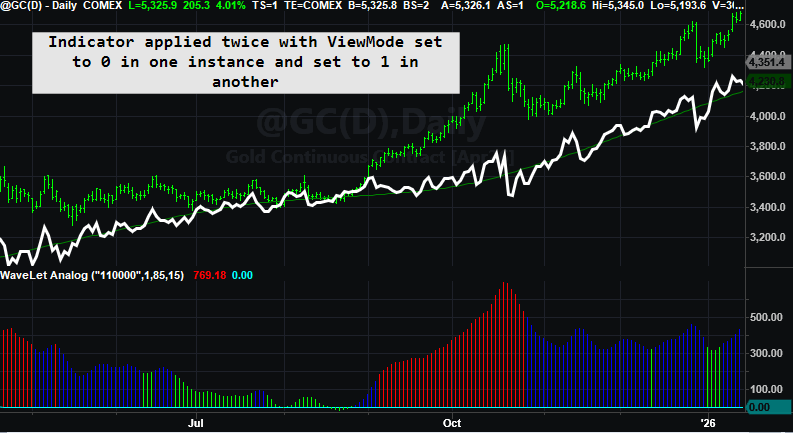
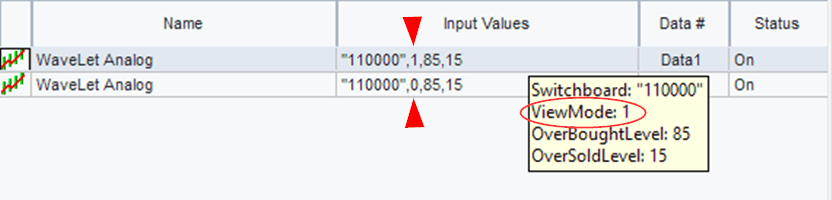
Wavelet Analog

Examples

Three charts are shown with three different presets.

Plotting 2 Scales in TradeStation

You can’t plot a single multiple output indicator with different scales in the same chart in TradesStation (well not easily). You have to plot either one or the other and this can be accomplished by using a plot toggle. Here is the toggle in EasyLanguage.

If ViewMode = 0 then
begin
Plot1(MasterOut, "MasterOut", White);
Plot2(Anchor, "Anchor", DarkGreen);
end
else
begin
Plot3(CutSignal, "CutLine");
Plot4(0, "Zero");
Different Plot Scale Toggle

Why EasyLanguage Should Be the Blueprint for Quant Languages

When I first ran into EasyLanguage, I didn’t take it seriously.

I come to this with a bias: I’m a lifelong systems programmer, and I helped build a trading platform the old-fashioned way.

Years ago I co-created Excalibur, a Fortran-based trading and backtesting engine. In that world, everything is explicit. If you want rolling windows, you build them. If you want indicator “memory,” you write the storage. If you want speed, you earn it with careful code and a lot of scaffolding.

So when I first encountered EasyLanguage, I didn’t take it seriously. It looked too simple—almost like “training wheels” for people who didn’t want to program.

Then time did what time always does: it changed my opinion.

After decades of building systems, libraries, and tooling—and watching how often good ideas get buried under boilerplate—I started to see EasyLanguage differently. It’s not “cute.” It’s a purpose-built quant DSL with one superpower that most general-purpose languages don’t give you for free:

Native time-series semantics.

In other words, EasyLanguage starts you in a world where “one bar ago” is normal, rolling windows are natural, and stateful indicators can be expressed as simple algebra. If I were building a quant language today, I’d copy that blueprint: human-readable rules plus time-series semantics baked into the language.

To explain why, I like a metaphor: Flatland versus Spaceland.


Flatland versus Spaceland

Flatland is where most beginners start—especially if they come from C, Python, or Excel. In Flatland, a variable is simply “a value right now.” The world feels perfectly sensible, but it’s missing something. The moment you need yesterday, or the last 30 bars, you’re forced into extra machinery: arrays, indexing, loops, buffers, bookkeeping.

Then comes the EasyLanguage moment—the part that feels like science fiction the first time you truly get it.

In Spaceland, the “missing dimension” exists: time. Variables don’t just have a current value; they have a built-in past. Close naturally includes Close[1]. Your own variables remember prior values. Rolling functions like Average() and RSI() aren’t special libraries—they’re native operations on values that already extend through time.

So the breakthrough isn’t learning a new function. It’s realizing you’ve been thinking on a plane, and EasyLanguage is operating in a world with one more dimension.

(If you’ve never read Edwin Abbott’s novella Flatland, no worries—this post borrows the idea, not the geometry. Abbott’s missing dimension is spatial; mine is time.)


Scalar versus series (without the esoterica)

In most general-purpose languages, a variable is a scalar: one value right now. If you want the last 30 values, you must store them and manage the indexing yourself.

In EasyLanguage, variables behave like series: the current value plus an implicit history. That’s why these feel natural:

If Close > Close[1] then ...
value1 = Average( (High + Low) / 2, 30 )
value2 = Average( RSI(Close, 14), 30 )


The “series prep” tax in Python

EasyLanguage can do this in one line because it can treat the expression (High + Low)/2 as a time series automatically:

MidPointAvg = Average((High + Low)/2, 30)

In Python—even if high and low already exist as lists—you still have to manufacture the series you want to average. Before you can average midpoints, you must first create a new midpoint list for the last lookBack bars:

# Assume:
# - high and low are lists (oldest -> newest)
# - currentBar is the index of the bar we're on "right now"
# - lookBack is how many bars we want to include
lookBack = 30

# Step 1) Build a NEW series (midpoint) for the last lookBack bars
midpointSeries = []

for barsAgo in range(lookBack):
bar = currentBar - barsAgo
if bar < 0:
break # ran out of history

midpoint = (high[bar] + low[bar]) / 2.0
midpointSeries.append(midpoint)

# Step 2) Now we can feed that newly created series to the generic average
mid_avg = average(midpointSeries)

Same goal. Totally different assumptions.

  • Python is scalar-first: you build the series.

  • EasyLanguage is series-first: the platform quietly supplies the time dimension.

Why EasyLanguage is a great engineering-to-trading bridge

If you’re coming from DSP or any engineering intensive discipline, you already know what you want to test: filters with memory, rolling statistics, trigger lines, crossings, parameter tweaks you can validate visually. The last thing you want is to burn weeks building infrastructure—buffers, indexing rules, warm-up handling—before you ever test the idea. EasyLanguage skips that entire tax. It starts you in Spaceland: time-series semantics are native, history is built in, and writing a filter looks like writing the math.

The mind-meld example (Ehlers High Pass)

Here’s a (simplified) EasyLanguage high-pass filter. From a programmer’s perspective, it’s mind-bending because it reads like algebra, but behaves like a stateful filter:


//Ehlers HighPass function - from his website
//https://www.mesasoftware.com/papers/

Inputs: Price(NumericSeries), Period(NumericSimple);


Vars: a1(0),
b1(0),
c1(0),
c2(0),
c3(0);

a1 = ExpValue(-1.414*3.14159 / Period);
b1 = 2*a1*Cosine(1.414*180 / Period);
c2 = b1; c3 = -a1*a1;
c1 = (1 + c2 - c3) / 4;
If CurrentBar >= 4 Then
EhlersHighPass = c1*(Price - 2*Price[1] + Price[2]) +
c2*EhlersHighPass[1] + c3*EhlersHighPass[2];
If CurrentBar < 4 Then
EhlersHighPass = 0;

The “magic” is here:

c2*EhlersHighPass[1] + c3*EhlersHighPass[2]

In computer-science terms, this is not “recursion” (no function calls itself). In signal-processing terms, it’s feedback: today’s output uses prior output. EasyLanguage makes that look effortless because the platform runs once per bar and preserves the prior values automatically.


Brain Meld Squared

If you’re a programmer, you know what kind of scaffolding this should require:

value1 = EhlersHighPass(Close, 14);
value2 = EhlersHighPass(Close, 28);

Those are two independent filters. Each one needs its own private memory—its own prior outputs—yet EasyLanguage gives you two clean calls. No objects. No buffers. No state management. It just works.


Ultra special: chaining filters

And if you can do that, you can do this:

value1 = EhlersHighPass(EhlersHighPass(Close, 14), 20);

That single line implies two live filter instances with separate state, running bar-by-bar, with the outer filter consuming the inner filter’s output as a time series. That’s series semantics and object-like behavior showing up at the same time—without the programmer ever building the scaffolding.


Closing thought

If I were designing a quant language today, I’d copy EasyLanguage’s blueprint: human-readable rules plus native time-series semantics. It lowers the barrier for non-programmers and removes the infrastructure tax for engineers who just want to test ideas quickly—especially the DSP-to-trading crowd.

Mean Reversion in 5 lines of code:

input: mDay(0),nDay(1),stopLossAmt$(1750),profitTargAmt$(5000),tradeLife(5);

if close > average(close,100) and close mDay days ago < close mDay + nDay days ago then
buy next bar at market;
if barsSinceEntry > tradeLife then sell next bar at open;

setStopLoss(stopLossAmt$);
setProfitTarget(profitTargAmt$);
Could be written as 5 lines, right?

Results

Simple EasyLanguage Code

This POINT is AVERAGE of 66 Values

All points that start with the address 2, 4 were all positive.  There were 66 observations.

66 addresses @ MDAY = 2 AND NDAY = 4

Splicing away all but MDAY = 2!  Big BLOBS.  Some were good (green) and some were bad (purple!)

Volumetric SLICED @ MDAY = 2

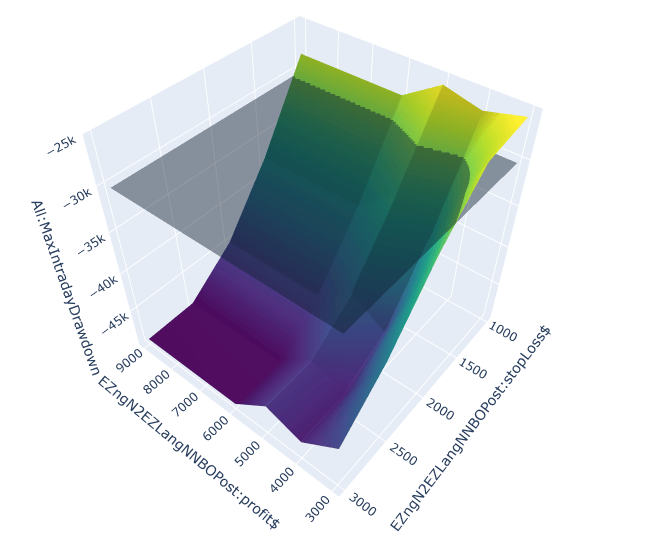
Magnifying the blobs – they break away into 6 distinct values – 4 dimensions in 3D Space.

Entering the MATRIX 4 Parameters plotted in 3 Dimensional

These graphs demonstrate a certain level of robustness.   As long as we stay in a bull market to a certain degree.

A Turtle Thermometer for Trend-Following: 2025 Results

A Bare-Bones Turtle Algorithm for Gauging Trend-Following Conditions

The core Turtle rules were fully mechanical, but several operational choices, such as position sizing nuances, market selection, roll/contract handling, and execution practices were left to judgment or circumstance. Many would argue the philosophy behind the Turtles mattered as much as the rules themselves, and differing interpretations of that philosophy go a long way toward explaining why their results diverged so widely. The mechanics, however, are straightforward: you can distill them from the published books and courses, strip them down even further, and apply the resulting rule set across a broad portfolio to take the pulse of trend-following today.

I’ve worked with the Turtle framework for many years, coded numerous variants, and even compared notes with a handful of original Turtles. If any method can “take the temperature” of market trendiness, this one can. This system synthesizes a shorter-term trend mechanism (that limits execution based on the prior outcome) with a true longer term trend following entry and exit method (two months of data are used to determine entry).   Short-term trading is difficult and often falls victim to over trading.  The shorter-term entry is used to try and capitalize on the genesis of a big trend.  Preventing another trade after a winner is one method of reducing trading and chop.  If the short-term break out turns into a trend and entry is prevented, then the 55-day break out is there to capture it.  Below are the rules I extracted to build a fully mechanical, bare-bones algorithm for that purpose.

Rules Used in This Analysis

Conventions & Definitions

  • Breakout (stop basis): Enter on a stop when price exceeds the specified lookback extreme by 1 tick (or exactly at the extreme if your platform supports that).
  • N: 20-day weighted Average True Range (WATR) used for both systems.
  • Risk stop (volatility stop): A stop placed 2×N from the entry price.
  • Swing stop: For System #1, use the 10-day highest high/lowest low; for System #2, use the 20-day highest high/lowest low.
  • Closest stop wins: The active protective stop at any time is the tighter of the risk stop and the swing stop.
  • Loser vs. non-loser (for System #1’s gating rule):
    • A trade that is stopped out by 2×N is a loser.
    • A trade that exits via the 10-day swing stop (even if it’s a loss) is not counted as a loser for gating.
    • Profitable exits via the 10-day swing stop are obviously not losers.

System #1 — 20-Day Breakout (Conditional)

Purpose: Only take the next 20-day breakout if the most recent 20-day breakout resulted in a 2×N loss.

  • Entry condition (gated):
    • Compute the 20-day Donchian channel.
    • You may only take a long (new 20-day high) or short (new 20-day low) breakout if the last System #1 trade ended with a 2×N risk stop.
    • If the last System #1 trade exited via the 10-day swing stop, it does not unlock the gate.
  • Initial protective stops (at entry):
    • Risk stop: 2×N from entry.
    • Swing stop: Opposite extreme of the past 10 days (lowest low for longs, highest high for shorts).
    • Use the tighter of the two stops at all times (“closest stop wins”).
  • Exit rules:
    • Exit if price hits the active stop (risk or swing).
  • Bookkeeping for gating:
    • If exit was the 2×N risk stop, mark the trade as a loser (this unlocks the gate for the next entry).
    • If exit was the 10-day swing stop, do not mark as a loser (gate remains locked).
  • Always evaluating: System #1’s breakout logic runs continuously, but entries are allowed only when the gate is unlocked by a prior 2×N loss.


System #2 — 55-Day Breakout (Always On)

Purpose: Classic trend capture that runs regardless of System #1’s state; does not affect System #1’s gating.

  • Entry condition (ungated):
    • Enter long on a 55-day high breakout; enter short on a 55-day low breakout.
  • Initial protective stops (at entry):
    • Risk stop: 2×N from entry.
    • Swing stop: Opposite extreme of the past 20 days (lowest low for longs, highest high for shorts).
    • Use the tighter of the two stops at all times.
  • Exit rules:
    • Exit if price hits the active stop (risk or swing).
  • Isolation from System #1:
    • System #2 trades and outcomes do not influence System #1’s “last-trade-was-a-loser” gate (also known as a filter).

The Portfolio

Currencies (CME FX)

Preferred name Short Futures ticker
Australian Dollar AUD @AD (6A)
British Pound GBP @BP (6B)
Canadian Dollar CAD @CD (6C)
Euro EUR @EC (6E)
Japanese Yen JPY @JY (6J)
Swiss Franc CHF @SF (6S)

Rates (CBOT)

Preferred name Short Futures ticker
30-Year U.S. Treasury Bond 30Y @US (ZB)
10-Year U.S. Treasury Note 10Y @TY (ZN)
5-Year U.S. Treasury Note 5Y @FV (ZF)

Equity/Index

Preferred name Short Futures ticker
E-mini S&P 500 ES @ES (CME)
U.S. Dollar Index DXY @DX (ICE)

Metals (COMEX/NYMEX)

Preferred name Short Futures ticker
Gold XAU @GC
Copper Cu @HG
Silver XAG @SI
Palladium Pd @PA=11INC
Platinum Pt @PL

Energies (NYMEX)

Preferred name Short Futures ticker
RBOB Gasoline RBOB @RB
Heating Oil HO @HO
WTI Crude Oil WTI @CL
Henry Hub Natural Gas NatGas @NG

Grains/Oilseeds (CBOT)

Preferred name Short Futures ticker
Soybeans Beans @ZS
Corn Corn @ZC
Rough Rice Rice @ZR
Wheat (SRW) Wheat @ZW
Soybean Meal Meal @ZM

Livestock (CME)

Preferred name Short Futures ticker
Feeder Cattle Feeders @FC (GF )
Live Cattle LiveCat @LC (LE )
Lean Hogs Hogs @LH (HE)

Softs (ICE)

Preferred name Short Futures ticker
Frozen Concentrated Orange Juice OJ @OJ
Sugar No. 11 Sugar @SB
Cotton No. 2 Cotton @CT
Coffee “C” Coffee @KC
Lumber Lumber @LBR = @LB legacy

Market Normalization (Fixed-Fractional Sizing)

To level the playing field across markets, I used fixed-fractional position sizing keyed to the Turtle “quick” 20-day ATR.

Risk budget per trade

  • Account equity =$250,000
  • Fraction at risk per trade =2%
  • Dollar risk per trade: = × = 0.02 × 250,000 = $5,000

Contracts to trade

  • Let ATR = 20-day (Turtle quick) Average True Range in price units
  • Let BPV = Big Point Value (dollars per 1.0 move)
  • Dollar risk per 1 contract: ATR × BPV
  • Position size (contracts):
  • Contracts =⌊ / ATR × BPV⌋

In words: allocate $5,000 of risk to each trade and size the position by dividing that risk by the market’s expected dollar move (ATR×BPV).   Round down to an integer.

Notes & conventions
  • ATR is the 20-day Turtle quick ATR (same used in the rules).
  • Use the correct BPV for each contract (e.g., ES $50/pt, CL $1,000/pt, SI $5,000/pt).
  • Enforce at least on contract per signal.
  • $50 slippage and $10 commission per round turn.

Results

Large portfolio performance on Bare Bones Turtle

This equity curve is very typical across the spectrum of most trend following systems.  There have been big years to keep the trend following momentum going – recently 2008, 2010, 2014, 2018, 2020.

Big Years – pushes the popularity of Trend Following

Many times, the futures and commodity markets are there to benefit from global events such as the banking collapse (2008) and the pandemic (2020).

Over the years, markets have fallen in and out of favor with Trend Following.  The best market over the past twenty years or so turned out to be sugar.  With its smaller size and associated volatility and trends it was the clear winner.

Many HOT SPOTS on the Correlation Heat Map

Pearson Correlation Matrix

But, what about smaller accounts?

There exist sub portfolios with better profit to draw down ratios.  If you could only choose ten markets and wanted to know the best combination, you can do this with my TS-PortfolioMerge software.  In fact, all the metrics and images I have shown in this post were generated with TS-PortfolioMerge.  If your budget only allows for 10 markets and you want to evaluate every combination you will need to wait a while for TS-PM to run through every combination.

Search space C(37,10) = 348,330,136 (subset) – yes that is 300 million combinations.  Just set up your computer for overnight processing.

But if you want a speedy answer, that will approximate the entire search space you can do that as well.

Sampled (limit 50,000; randomized).

# P/DD Net Profit ($) Max DD ($) Symbols
1 12.071 1,615,758.97 133,857.91 @EC, @HG, @HO, @JY, @LB=11INC, @LH, @RB, @SB, @SM, @TY
2 11.676 1,333,359.10 114,194.85 @FC, @GC, @HO, @KC, @LB=11INC, @LBR=11INC, @LH, @OJ, @SB, @SM
3 11.563 1,473,201.00 127,410.20 @C, @CL, @EC, @ES, @GC, @HG, @HO, @LBR=11INC, @LH, @SB
4 11.545 1,601,806.50 138,745.50 @C, @CL, @CT, @GC, @HO, @LH, @RB, @SB, @SM, @US
5 11.444 1,427,082.85 124,705.40 @CL, @GC, @HO, @KC, @LB=11INC, @LBR=11INC, @LH, @OJ, @S, @SB

Run the speedy version multiple times to see if the same portfolio bubbles to the top.  If you continue getting different portfolios, you can run the exhaustive mode.  Here the best 10 markets were:

@EC, @HG, @HO, @JY, @LB=11INC, @LH, @RB, @SB, @SM, @TY

Here you have two currencies (EC and JY), one metal (HG), two energies (HO and RBOB), one interest rate (TY), sugar, lumber, soybean meal and lean hogs.  But are we guilty of cherry picking?  Maybe the Monte Carlo analysis will provide some insight.

Monte Carlo Analysis on 10 of the best combination from the Speedy output.

Conclusion

Trend Following as of late October 2025 is doing well and doing as expected.  The pandemic pulled the algorithm out of the doldrums and positive years have been banked since.  The current year looks like the exception, but we still have two months left.  With the Gold move you would think 2025 would have been a banner year.  The Trend is STILL OUR FRIEND.

Email me if you would like my code for my bare bones Turtle system, I utilized to create all these results.  The code includes the human curated LAST TRADE WAS A LOSER function.

Concentration, Catalysts, and Crickets: Brewing the Perfect Slippage Storm

In today’s trading environment where a single stock dominates an index, you must be careful with your order placement (if you can) around potentially large news events.

I am late with this post, but my client (I program for him) suffered through a Perfect Slippage Storm.  A short-term system is only as good as its ability to be properly executed.    On August 27th, 2025, NVIDIA announced after the market close.  According to ChatGPT.

Yes—that timing lines up with Nvidia’s earnings release hitting after the bell. On Wed, Aug 27, 2025, outlets were primed for the NVDA press release around 4:20 pm ET; live blogs called out that exact time window, and NVDA headlines/press release started landing shortly after, with shares dipping in early after-hours. That kind of instant move in NVDA typically ripples straight into NQ.

Check out the following graphic.

The Perfect Slippage Storm!

Can this really happen?

Come on – this is a 5-minute bar, right?  A lot of things can happen in five minutes.  I was a futures broker for many years and my rule of thumb during my tenure was you MAY get out at the low of the minute bar if there is a hiccup and your sell stop is blown.  Here is a one-minute chart.

Some orders were filled at the tick up on the 2nd minute bar.

My client wasn’t lucky this day and got filled near the low of the 2nd minute bar.  He was using a % trailing stop and when the high breached his threshold his protective stop was cancelled, and the new stop was implemented.  All this activity takes time.  And this strategy is professionally managed.

Why was this a perfect storm?

The report pop printed a new intraday high, likely tripping resting buy-stops and in this case pulling trailing protective stops tighter. Those sell-stops then fired into a thinning book after 4:00 p.m. ET, where Nasdaq futures liquidity is razor thin. Some orders were rejected or re-priced and ended up converting to market, worsening slippage. In this case, my client would have been better off if the trailing-stop threshold hadn’t been touched.

Electronic Trading and Fast Market Conditions and Not Held Order!

You believed the trade was up $400, but your day-end statement shows a loss of –$3,400. That disconnect usually comes from execution during a fast market. When your order is not held, the broker (or algo) has time/price discretion and no obligation to fill at a specific price. In a sudden air-pocket, quotes vanish and price gaps; the broker can’t predict the next print, so the only thing he can do is hit the first available liquidity. The result is slippage and a gaping difference between what is on the screen on what is in your pocket or the lack thereof.

A Stop Limit order can help during spikes or down drafts

This type of order is not universally available – especially when using algos.

A buy stop-limit order is a two-part order used to enter long above the market (or cover a short) with price control.

  • Stop price (trigger): When the market trades at or above this price, your order activates.

  • Limit price (cap): Once activated, the order becomes a limit buy at your limit price (or better). It will not pay more than the limit.

What should my client do in the future?

He tested his strategy over 15 years of data and felt secure enough to trade the system.  He knows that this market action could have just as easily gone in his favor.  Had the initial reaction carried on, he may have made a nice profit.  Should he augment his strategy to get out at the end of the day and then get back in – step over post-closing reports?  Maybe, but there is always the potential of slippage on this out and back in trade.  Also, you would need to use discretion as to when a handful of stocks controls the entire index.

Percent trailing stops only help if your profit trigger is meaningfully large and you’re willing to give back a realistic slice of that profit.

When a client shows me an equity curve that looks too good to be true, my first question is whether they’re using a percent trailing stop. I hope they say no—but usually it’s yes. Then I ask two things:

  1. What’s the profit threshold that arms the trail?

  2. How much are you willing to give back once it arms?

If the threshold is small and the give-back is ~20% or less, I know we’re in Best-Case Scenario Syndrome: backtests assume friendly fills. Platforms like TradeStation or MultiCharts will print a theoretical fill on every trade, but as we saw earlier, the gap between theory and actual can be huge.

You must accept that slippage is going to occur

If you don’t then you cannot trade.  You might come back at me and say: “Well, I will only use stop limit orders.”  That is great. but what about when exiting a trade.  “I will only develop a strategy that enters on limits – that way I can cut slippage in half.”  That is definitely a possibility.  “I will execute myself and forgo the convenience of algo order placement.”   Well, you better quit your day job and trade during the day.

Can the Recursive Gaussian Channel Beat the Battle Tested Bollinger Band?

Bridging 19th‑century mathematics and 21st‑century trading methods

A client sent me what looked like a simple indicator written in TradingView’s Pine Script—though I didn’t realize it was Pine at first—and asked if I could port it to EasyLanguage (or PowerLanguage for MultiCharts). If you Google “Gaussian Channel Donovan Wall TradingView,” you’ll find the original code. Pine Script isn’t exactly newcomer-friendly; it’s fine once you get the feel for it, but I’m spoiled by EasyLanguage, which —at least to my eye—reads almost like plain English. (Others may beg to differ!) Below is a brief Pine snippet; to this humble EL devotee, it’s more hieroglyphics than prose.

    _m2 := _i == 9 ? 36  : _i == 8 ? 28 : _i == 7 ? 21 : _i == 6 ? 15 : _i == 5 ? 10 : _i == 4 ? 6 : _i == 3 ? 3 : _i == 2 ? 1 : 0
_m3 := _i == 9 ? 84 : _i == 8 ? 56 : _i == 7 ? 35 : _i == 6 ? 20 : _i == 5 ? 10 : _i == 4 ? 4 : _i == 3 ? 1 : 0
_m4 := _i == 9 ? 126 : _i == 8 ? 70 : _i == 7 ? 35 : _i == 6 ? 15 : _i == 5 ? 5 : _i == 4 ? 1 : 0
_m5 := _i == 9 ? 126 : _i == 8 ? 56 : _i == 7 ? 21 : _i == 6 ? 6 : _i == 5 ? 1 : 0
_m6 := _i == 9 ? 84 : _i == 8 ? 28 : _i == 7 ? 7 : _i == 6 ? 1 : 0
_m7 := _i == 9 ? 36 : _i == 8 ? 8 : _i == 7 ? 1 : 0
_m8 := _i == 9 ? 9 : _i == 8 ? 1 : 0
_m9 := _i == 9 ? 1 : 0

I could see right away that the code was doing some kind of coefficient “lookup,” so I ran it through ChatGPT to get a quick explanation. The model suggested it was building weights from Pascal’s Triangle. A bit later the client sent me the original TradingView post, which confirmed the script was using John Ehlers’s Gaussian filter to build a channel—similar in spirit to Keltner or Bollinger bands.

Once Ehlers’s name popped up, the next stop was his resource-rich site (mesasoftware.com/TechnicalArticles) for the theory behind the filter. I also searched for a ready-made EasyLanguage version but came up empty. With ChatGPT’s help I decided to roll my own; after all, knocking out support code like this is exactly what these AI tools are for.

What do Carl Friedrich Gauss, Blaise Pascal, and the markets have in common.

You’ve probably bumped into the bell curve in school—maybe in a stats class, maybe when teachers “graded on a curve.” Mathematicians call it by a few interchangeable names:

  • Normal distribution (stats class)
  • Gaussian curve (named after Carl Friedrich Gauss)
  • Binomial curve (because it pops out of Pascal’s Triangle)

No matter the label, it’s the same smooth hump that says, “most values cluster in the middle, very few at the extremes.” Gauss formalized the formula, Pascal’s Triangle supplies the ready‑made integer weights, and traders borrow both ideas to build filters that tame noisy price charts.

Big picture: Gauss gives us the shape of the curve, Pascal gives us the exact numbers to approximate it, and that combo lets us create a market indicator that reacts quickly and stays smooth.

How does this help build an indicator?

The word channel is in the name of the indicator, so it was highly likely we are dealing with a smoothed price with an upper and lower band a certain distance from the smoothed price.  If you feed this into Chat GPT and ask for it in EasyLanguage, it will create an indicator using a bunch of arrays.  See Chat GPT isn’t 100% knowledgeable of EasyLanguage like it is with python.  It didn’t understand the concept of EasyLanguage’s serialized variables.  You know where you can refer to a prior value of a variable – myValue[1] or myValue[2].  Chat tries to replicate this with the usage of arrays which gets you into a bunch of trouble right off the bat.  Let’s discuss this a little later.

The Mechanics of smoothing price with Pascal’s Triangle, or Gaussian Kernal or Binomial Coefficients.

(a + b)^2 = a^2 + 2ab + b^2 → coefficients 1  2  1

(a + b)^3 = a^3 + 3a^2b + 3ab^2 + b^3 → coefficients 1 3 3 1

(a + b)^4 = a^4 + 4a^3b + 6a^2b^2 + 4ab^3 + b^4 → coefficients 1 4 6 4 1

(a + b)^5 → coefficients 1 5 10 10 5 1

(a + b)^6 → coefficients 1 6 15 20 15 6 1

(a + b)^7 → coefficients 1 7 21 35 35 21 7 1

(a + b)^8 → coefficients 1 8 28 56 70 56 28 8 1

(a + b)^9 → coefficients 1 9 36 84 126 126 84 36 9 1
Binomial Coefficients

Stack those rows, keep going, and you build Pascal’s Triangle—each number is the sum of the two numbers just above it.

Look at the 7th row of Pascal’s Triangle:

1  6  15  20  15  6  1

Normalize those numbers (divide by their sum), and you obtain a discrete approximation of a Gaussian kernel.  Big Deal, right?  You don’t need to know the math behind this, just know that each row in Pascal’s triangle is symmetric.  Each row starts are one and ends at one.  You can use these coefficients to weight each value across a period of time.  Do you mean all this math stuff is akin to a weighted moving average.

Idea Weighted Moving Average Binomial / Gaussian weights Why they feel similar
What it does Averages recent prices, but gives newer bars bigger weights (e.g., 1-2-3-4). Averages recent prices using the numbers from Pascal’s Triangle (e.g., 1-4-6-4-1). Both are just weighted sums of past prices.
Shape of the weights Forms a triangle – rises steadily to the newest bar, then drops to zero beyond the window. Forms a bell – climbs to the centre, then falls off symmetrically. Triangles and bells are both peaked shapes: the middle matters most, the edges least.
Normalizing step Divide by the sum of the weights (e.g., 1+2+3+4 = 10) so they add to 1. Same: divide by 1+4+6+4+1 = 16 so they add to 1. After normalizing, each is just a fancy way to say “take a percentage of each bar and add them up.”
Smoothing power Good at knocking out single-bar noise, but the straight sides of the triangle let more mid-frequency wiggles through. Slightly better at suppressing both very fast and mid-speed wiggles, so the line looks cleaner. Both cut random jitter while trying not to lag too far behind real turns.
Math connection A single pass of linear weights. What you get if you apply a two-point moving average over and over again (each pass builds the next Pascal row). Re-applying a simple WMA repeatedly evolves into the binomial weights – that’s the family link.

Which comes first the indicator or the function that feeds the indicator?

If you are working with code and especially with ChatGPT or any other LLM you need a medium where you can quickly program and observe results.  The indicator analysis module will give you instant results. and this is where you should start.  However, if you look at the TradingView code of the Gaussian Channel you will notice that the smoothing function is called twice, once for the close and once for the true range on each bar.  In other words, you are using the same code twice and incorporating this without functions would be redundant.  In my first attempt, I created the smoothing function and named it Binomial, and the channels were a magnitude of 10 below the current price.  So, all the price bars were scrunched at the very top of the chart.  At first if you don’t succeed, try and try and try and try again.

At first ChatGPT kept insisting on arrays because it didn’t realize EasyLanguage can reference earlier bars just by tagging a variable with [n]. EasyLanguage conveniently hides that bookkeeping, but you have to tell the model so it stops reinventing circular buffers. Once I explained that a local variable—say filt—already remembers its prior values (filt[1], filt[2], etc.), the conversation moved forward.

The next hurdle was clarifying that Donovan’s script feeds raw data (Close and TrueRange) into every stage, not the output of the previous stage. ChatGPT was trying to build a true cascade—each pole using the prior pole’s result—whereas Donovan calculates each pole completely independently. After I pointed that out, the model rewrote the logic correctly and even walked me through the difference:

  1. Cascaded filter → Pole 2 uses Pole 1’s output, Pole 3 uses Pole 2’s, and so on.

  2. Independent poles → Every pole starts over with the raw Close and Range.

That explanation finally squared the circle and let me produce an EasyLanguage version that matches the original TradingView indicator.

“Cascade” = one stage feeding the next

Think of a cascade as a relay race:

  1. Stage 1 (“Pole 1”) takes the raw price, smooths it a little, and hands the baton to …

  2. Stage 2 (“Pole 2”), which smooths the output of stage 1 a bit more, then passes to …

  3. Stage 3, and so on.

After 4-, 6-, or 9-hand-offs the combined shape of all those little smooths matches the full Gaussian bell.


The indicator lets you pick anywhere from two to nine poles to do the heavy lifting on the data-smoothing. And no, we’re not talking about the North and South Poles—or the kind you cast a fishing line from.

So, what is a pole?

In filter speak, a pole is one little “memory stage” inside the math that reaches back to yesterday’s value (or last bar’s value) before deciding today’s output. Stack more poles and you stack more of those memory stages:

  • 1 pole → basically a quick-and-dirty exponential average.

  • 4 poles → four mini-averages chained together; much smoother, a hair more lag.

  • 9 poles → nine stages deep; super-silky curve, but you’ll feel the delay.

Think of each pole as a coffee filter. One filter catches the big grounds, two filters catch the sludge, and by the time you’ve got nine stacked up, you’re practically drinking distilled water. Same beans in, different smoothness out.

You can dial in two extra tweaks:

  • Lag compensation – Tell the code to look one step ahead by swapping in a one-bar forecast of price for the raw price. That little nudge pulls the channel forward so it doesn’t trail the market.
  • Extra smoothing – Want the line even silkier? Flip the switch and the function just averages the most-recent two filter values. It’s a tiny moving average—jitter drops a notch, lag creeps up by only half a bar.

For illustrative purposes this is how Pole 6 is calculated.  I also show a mapping scheme to store Pascal’s triangle into arrays.  I put all this code inside a function with the name BinomialFilterN.

{─────────────────────────────────────────────────────────────────────
2. Hard-code every Pascal row (n = 1 … 9)
─────────────────────────────────────────────────────────────────────}
once
begin
{ n = 1 : 1 1 }
m0Map[1] = 1; m1Map[1] = 1;

{ n = 2 : 1 2 1 }
m0Map[2] = 1; m1Map[2] = 2; m2Map[2] = 1;

{ n = 3 : 1 3 3 1 }
m0Map[3] = 1; m1Map[3] = 3; m2Map[3] = 3; m3Map[3] = 1;

{ n = 4 : 1 4 6 4 1 }
m0Map[4] = 1; m1Map[4] = 4; m2Map[4] = 6; m3Map[4] = 4;
m4Map[4] = 1;

{ n = 5 : 1 5 10 10 5 1 }
m0Map[5] = 1; m1Map[5] = 5; m2Map[5] = 10; m3Map[5] = 10;
m4Map[5] = 5; m5Map[5] = 1;

{ n = 6 : 1 6 15 20 15 6 1 }
m0Map[6] = 1; m1Map[6] = 6; m2Map[6] = 15; m3Map[6] = 20;
m4Map[6] = 15; m5Map[6] = 6; m6Map[6] = 1;

{ n = 7 : 1 7 21 35 35 21 7 1 }
m0Map[7] = 1; m1Map[7] = 7; m2Map[7] = 21; m3Map[7] = 35;
m4Map[7] = 35; m5Map[7] = 21; m6Map[7] = 7; m7Map[7] = 1;

{ n = 8 : 1 8 28 56 70 56 28 8 1 }
m0Map[8] = 1; m1Map[8] = 8; m2Map[8] = 28; m3Map[8] = 56;
m4Map[8] = 70; m5Map[8] = 56; m6Map[8] = 28; m7Map[8] = 8;
m8Map[8] = 1;

{ n = 9 : 1 9 36 84 126 126 84 36 9 1 }
m0Map[9] = 1; m1Map[9] = 9; m2Map[9] = 36; m3Map[9] = 84;
m4Map[9] = 126; m5Map[9] = 126; m6Map[9] = 84; m7Map[9] = 36;
m8Map[9] = 9; m9Map[9] = 1;
end;

{─────────────────────────────────────────────────────────────────────
3. Working variables
─────────────────────────────────────────────────────────────────────}
variables:
beta_(0), { = 1 – alpha }
f1(0), f2(0), f3(0), f4(0), f5(0),
f6(0), f7(0), f8(0), f9(0),
f(0);

beta_ = 1 - alpha;

{─────────────────────────────────────────────────────────────────────
4. Initialise memory until we have enough bars
─────────────────────────────────────────────────────────────────────}
if currentBar <= poleCount then
begin
f1 = 0; f2 = 0; f3 = 0; f4 = 0; f5 = 0;
f6 = 0; f7 = 0; f8 = 0; f9 = 0;
end
else
begin
{================== 1-pole ==================}
if poleCount = 1 then
begin
f1 = m0Map[1]*power(alpha,1)*source
+ m1Map[1]*power(beta_,1)*f1[1];
f = f1;
end;

{================== 2-pole ==================}
{================== 3-pole ==================}
{================== 4-pole ==================}
{================== 5-pole ==================}
{================== 6-pole ==================}

if poleCount = 6 then
begin
f6 = m0Map[6]*power(alpha,6)*source
+ m1Map[6]*power(beta_,1)*f6[1]
- m2Map[6]*power(beta_,2)*f6[2]
+ m3Map[6]*power(beta_,3)*f6[3]
- m4Map[6]*power(beta_,4)*f6[4]
+ m5Map[6]*power(beta_,5)*f6[5]
- m6Map[6]*power(beta_,6)*f6[6];
f = f6;
end;
Code showing Pascal's Triangle and 6 pole smoothing

There is redundant code here, but I included it to make it readable for most of my EasyLanguage/PowerLanguage programmers.   The math is very simple when you break it down.  If we choose Pole #6 all we do is:

beta_ = (1 – Cosine(360 / per)) / (Power(1.414, 2 / numPoles) – 1);
alpha = -beta_ + SquareRoot(beta_ * beta_ + 2 * beta);

  1. 1 x alpha^6 x close
  2. plus 6 x beta^1 x prior f6[1]
  3. minus 15 x beta^2 x f6[2]
  4. plus 20 x beta^3 x f6[3]
  5. minus 15 x beta^4 x f6[4]
  6. plus 6 x beta^5 x f6[5]
  7. minus 1 x beta^6 x f6[6]

EasyLanguage’s trig calls expect degrees, while most other languages want radians. That’s why the code feeds Cosine(360 / per)—the 360 converts the cycle length into degrees before taking the cosine.

I also lift the constant √2 (1.414…) by squaring it with Power(1.414, 2)and use the same Power routine for roots—for example, the cube root of x is simply Power(x, 1 / 3).

I placed BinomialFilterN inside a second routine called GaussianChannelFunc—a classic wrapper.

Why bother with the extra layer?

Reason What the wrapper does before/after calling BinomialFilterN
Housekeeping • Converts the user-friendly period (per) into the α required by the core filter.• Optional one-bar “look-ahead” to cancel lag.• Runs the filter twice (price and TrueRange).
Packaging • Builds upper, centre, and lower bands from the two filtered series.• Returns all three numbers through one array argument.
Extensibility Tomorrow you can tweak the channel logic—different volatility measure, ATR multiplier, extra smoothing—without touching the filter math. The heavy-duty code stays in BinomialFilterN; the wrapper simply preps inputs and formats outputs.

Think of it as a coffee machine:

  • BinomialFilterN is the brewing unit—hot water + grounds in, espresso out, and it never changes.
  • GaussianChannelFunc is the barista: grinds the beans, measures the water, adds milk and foam, then hands you the finished latte. If you want vanilla syrup tomorrow, you ask the barista; you don’t redesign the boiler.

By splitting the work this way, each piece stays focused, easier to test, and simple to extend later.

The wrapper has to hand back three numbers—upper band, centre line, and lower band—yet an EasyLanguage function can formally return only one. The standard workaround is to pass the additional outputs by reference:

// upper are caught by the receiving function as type numericRef
// can get unweilding quickly
value1 = GaussianChannelFunc(src, periods, numOfPoles,compLag, smooth, upper, mid, lower);
Code Snippet - Calling the function with three containers for the levels

That works, but the call quickly turns into a mile-long argument list.
Instead, I bundle those three outputs into a tiny array and pass the array’s address once:


array:GaussianChanArray[3](0); // remember we can use [0]

value1 = GaussianChannelFunc(src, periods, numOfPoles, compLag, smooth,GaussianChanArray);

upperChannel = GaussianChanArray[0];
centreLine = GaussianChanArray[1];
lowerChannel = GaussianChanArray[2];
Using a simple array as container for return values

This wasn’t that impressive, but what if your function needed to return five values?

Now onto the indicator and the strategy

From the outside this looks like a quick coding job—but getting here was a series of detours. I let ChatGPT drive and only nudged when it went off-track. Here are the dead-ends we hit before the indicator finally behaved:

  • Pine-script blind spot
    • ChatGPT didn’t recognise TradingView syntax, so its first translation attempts were gibberish.
  • “Mystery math” instead of binomial weights
    • After I mentioned Ehlers and Gaussian smoothing, the model invented a dynamic weighting scheme rather than using the fixed Pascal-triangle numbers the original script relies on.
  • Arrays everywhere
    • It kept insisting on circular buffers because it didn’t realise EasyLanguage variables already remember their own history via [1], [2], etc.
  • Wrong memory reference
    • Even after the array issue was fixed, the code updated each pole with raw price / range instead of the pole’s own prior output.
  • Unwanted filter cascade
    • ChatGPT then tried a true “cascade” (pole 2 fed by pole 1, pole 3 by pole 2). Donovan’s version calculates every pole independently—so we had to unwind that and start over.
  • Sign-flip confusion
    • It forgot the plus/minus pattern that keeps the Gaussian zero-lagged, producing a line that trailed price by several bars.

Each course-correction tightened the spec until the model finally spit out the straight, hard-coded-coefficients version you see now.

After all that was it worth the time and analysis?

  • A stop version where you buy at and sell short at the upper and lower levels worked best.  Liquidating at the midlevel on a stop was also incorporated.
  • Using a large profit objective and a relatively small stop loss seemed to work best.
  • Intermediate period length and utilizing 8 poles produced the best results.

ELD for TradeStation and Multicharts

GAUSSIANSTUDY

Text files of functions, indicator and strategies

GaussianChannelFunc Function

Head to Head with Bollinger Bands

Test results across 22 commodities for the past 25 years.

Gaussian Channel:  Optimizing the period and ATR multiplier with 8 poles:

Simple Bollinger Band: optimizing moving average length and number of standard deviations

Conclusion (fight-card style)

Decision on the first bout:
The Rolling heavy-hitter—Bollinger Bands—lands the cleaner power shots and takes the scorecards in our 22-commodity test.

But don’t call it a knockout just yet.
The Recursive counter-puncher—the Gaussian Channel—fights with an extra weapon: pole count. Adjusting those poles changes how tightly the centre line hugs price, and we’ve only sparred with one setting.

Next round:
Tune the poles, test different time-frames, and pit the fighters on equities and FX. The smarter, jabbing Gaussian might steal the rematch once its footwork is dialed in.


EasyLanguage Version Control and Back Up

I Can’t Believe I Just Lost All My Studies!

“How can I not restore it? I back up my files every week!” Have you found yourself in this same predicament before.  Somehow, I’ve lost my code more times than I care to admit. The TradeStation and MultiCharts paradigm of requiring us to store our precious strategies and indicators in a proprietary, non–text format has its advantages, but to me the drawbacks far outweigh any benefits.

  • Pros of a proprietary library: Seamless integration, single-click compile/run, built-in (if limited) version history, encryption, and straightforward workspace management.

  • Cons: Opaque blobs that aren’t easily diffed, harder to back up in granular increments, potential single point of failure, and extra steps when migrating to other tools.

Git is overkill for a single developer of an EasyLanguage Study.

Most programmers who work in a domain‐specific language like EasyLanguage simply don’t “get” Git. If you’re unfamiliar with Git, here’s a quick definition:

Git is the version‐control system created by Linus Torvalds—yes, the same Linus Torvalds who gave us Linux and turned down a huge payday to release it as open source. Git lets multiple developers track changes, revert to earlier versions, and collaborate seamlessly on code without stepping on each other’s toes.

Git records changes to a project by taking snapshots (commits) of its files and storing them in a distributed repository, so developers can branch and merge independently before synchronizing updates. It’s often hard to grasp because the concepts of branching, merging, and distributed workflows differ from linear, centralized versioning models and require a shift in thinking and terminology.

Fun fact: ChatGPT did a back-of-the-envelope calculation suggesting that, had Linus charged for Linux, his net worth could be as high as $50 billion. In reality, he’s a salaried employee at the Linux Foundation with a net worth closer to $10 million—proof that the open-source model can be wildly generous for everyone except the original author.

What is an EasyLanguage programmer to do?

One straightforward (but labor-intensive) method is to copy your EasyLanguage or PowerLanguage code into a plain-text editor like Notepad and save it in a well-named folder—either locally or in the cloud. That gives you a basic text-based backup. If you want to track versions, you can simply take a snapshot every time you make a change and append a version number to the filename (e.g., MyStrategy_v1.0.txt, MyStrategy_v1.1.txt, etc.). For most solo EasyLanguage developers, this ad-hoc versioning is sufficient, since you’re typically the only person editing the code. However, in the unlikelihood that you do collaborate with others, it becomes cumbersome to merge updates or see exactly what changed between versions. In this scenario, learning GIT would be worthwhile.

Because EasyLanguage developers typically work solo (to protect their proprietary code), most don’t bother with Git. And let’s face it—many of us get lazy about backups and versioning. You create a strategy that works, start tweaking it, and before you know it you can’t recall how to revert to the original. Who else has been down that road?

A few years ago, I developed a simple macro with AutoIt where I would hit <CTRL> F9 and all the code in my current editor window was select and copied and saved to a new text file.

Recently I modified the macro to add a version suffix to the filename if the filename already exits.  If you hit save and the lates version is _v002.txt, then the macro will save it as _v003.txt

Back up – Checked!  Version control – Checked!  Anything else?

I do use Git for my multi‐file projects—it’s fantastic for instantly showing me what changed between commits when something breaks. I wish I had that same “see the diff” workflow for my EasyLanguage scripts. Thanks to WinMerge, I actually can: just select two versions of my script, and it highlights every added, removed, or modified line. WinMerge is free to use (they do ask for a small donation if you find it valuable), and now I can conveniently compare any two snapshots of my code—just like I would with Git.

The differences will be highlighted in the document maps on the left side and then also directly in the code.

Take a look at this video to see my workflow.

What good are these tools if you don’t use them?

I tried to make the task of backing up and version control as simple as clicking <ctrl> F9.  Now it is up to you to do it.  I promise the more you do it, the less of hassle it will become, and I can almost guarantee you will thank me in the future.  Trust me – this is as easy as GIT.  However, setting up GIT is not a cakewalk.

Here all you need to do is download the two software and following the instructions in getting the following script compiled to an .exe.  Trust me it is much easier than it looks.  I am providing this information so that I don’t have to provide an .EXE and all of the headaches involved with downloading it.  However, if you are cool with downloading an .EXE, then shoot me an email and I will provide a link.

In few days I will publish some results of the work of my “Snap-Back” strategy.

This is the AutoIt script you will need to copy after you download AutoIt.  Don’t worry you don’t need to understand it.  After the code listing, I give step by step instructions on how to turn the script into an executable.

#include <Clipboard.au3>
#include <File.au3>
#include <MsgBoxConstants.au3>
#include <StringConstants.au3>

; Set hotkeys:
HotKeySet("^{F9}", "CaptureActiveWindow") ; F9 → capture text
HotKeySet("^{F12}", "TerminateScript") ; F12 → exit script

; Keep the script running
While 1
Sleep(100)
WEnd

Func CaptureActiveWindow()
; 1) Get full active window title
Local $activeTitle = WinGetTitle("[ACTIVE]")

; 2) Extract just the tab name (text after the last " - ")
Local $tabName = StringRegExpReplace($activeTitle, '^.* - (.+)$', '\1')
If $tabName = $activeTitle Then
; no dash found, use full title
$tabName = $activeTitle
EndIf

; 3) Remove illegal filename characters
Local $cleanTitle = StringRegExpReplace($tabName, '[\\\/:\*\?"<>\|]', "")
If $cleanTitle = "" Then $cleanTitle = "CapturedText"

; 4) Build default filename
Local $defaultFileName = $cleanTitle & ".txt"

; 5) Activate window and copy its contents
WinActivate($activeTitle)
Sleep(200)
Send("^a") ; Select all
Sleep(200)
Send("^c") ; Copy
Sleep(200)

; 6) Retrieve clipboard text
Local $text = _ClipBoard_GetData()
If @error Then
MsgBox($MB_ICONERROR, "Error", "Failed to get clipboard data.")
Return
EndIf

; 7) Ask user where to save, defaulting to our cleaned tab name
Local $savePath = FileSaveDialog( _
"Save Captured Text", _
@ScriptDir, _
"Text Files (*.txt)", _
2, _
$defaultFileName _
)
If $savePath = "" Then
MsgBox($MB_ICONINFORMATION, "Cancelled", "Save operation cancelled.")
Return
EndIf

; 8) Simple version control: if the file exists, append _v001, _v002, ...
Local $base = StringTrimRight($savePath, 4) ; remove .txt
Local $ext = ".txt"
Local $i = 1
Local $dest = $savePath
While FileExists($dest)
$dest = $base & "_v" & StringFormat("%03d", $i) & $ext
$i += 1
WEnd

; 9) Write the text to the versioned filename
Local $fileHandle = FileOpen($dest, 2) ; write mode
If $fileHandle = -1 Then
MsgBox($MB_ICONERROR, "Error", "Failed to open file for writing.")
Return
EndIf
FileWrite($fileHandle, $text)
FileClose($fileHandle)

MsgBox($MB_ICONINFORMATION, "Success", "Text saved successfully to:" & @CRLF & $dest)
EndFunc

Func TerminateScript()
Exit 0
EndFunc
Auto It Script - Set it and Forget it

Step 1: Download and Install AutoIt (plus SciTE-Lite)

  1. Go to the AutoIt website: https://www.autoitscript.com/site/autoit/downloads/
  2. Under “AutoIt Full Installation,” click Download.
  3. Run the downloaded installer (AutoIt3.exe) and follow the prompts:
  • Accept the license agreement.
  • Leave all default components checked (this installs both AutoIt and SciTE-Lite).
  • Finish the installation.

After this, you’ll have:

  • AutoIt (the compiler/interpreter) in your Program Files.
  • SciTE-Lite (a lightweight code editor preconfigured for AutoIt) installed, usually at
 C:\Program Files (x86)\AutoIt3\SciTE\

Step 2: Open SciTE-Lite and Create a New Script

  1. Launch SciTE-Lite:
  • Windows Start Menu → All Programs → AutoIt v3 → SciTE-Lite (AutoIt)
  • Or double-click the SciTE-Lite shortcut if one was placed on your desktop.
  • In SciTE-Lite, go to File → New (or press Ctrl+N). You’ll see a blank editor window.

Step 3: Copy Your Script Code from the Website

  1. Select all of the code (click inside the code block above, then press Ctrl+A) and copy (Ctrl+C).
  2. Return to the blank SciTE-Lite window and paste (Ctrl+V) the code into it.

Step 4: Save the Script as EzLangToText.au3

  1. In SciTE-Lite, choose File → Save As… (or press Ctrl+Shift+S).
  2. In the “Save As” dialog:
  • Navigate to Documents\AutoIt Scripts\ if it exists or stay in the default folder.
  • For “File name,” type:
  • EzLangToText.au3
  • Ensure “Save as type” is set to AutoIt v3 Source (*.au3).
  • Click Save.

Now SciTE-Lite knows this is an AutoIt script.


Step 5: Compile the Script to an .exe

  1. Make sure EzLangToText.au3 is the active tab in SciTE-Lite.

  2. Press F7 (or go to Tools → Compile).

  • SciTE-Lite runs AutoIt’s compiler (Aut2Exe) behind the scenes.
  • In the output pane at the bottom, you’ll see messages like “Compiling…” and finally “Compiled successfully.”
  • When the compile finishes, you’ll find EzLangToText.exe in the same folder as your .au3 file.

Step 6: Run the Resulting EXE

  • You can now double-click EzLangToText.exe to run it on any Windows PC (no AutoIt installation needed)


Backtesting with [Trade Station,Python,AmiBroker, Excel]. Intended for informational and educational purposes only!